Use Amplify DataStore
Use DataStore
If you were to disconnect your mobile app from the network, you would notice that it would fail in it’s call to add items to the menu.
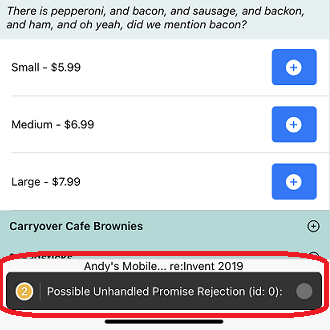
This is because there is not an offline capability built in to fix this. Instead, we can use Amplify DataStore to do this. The first thing we have to do is generate DataStore models that we can use to pass into our DataStore APIs. These are strongly typed interfaces that are used by DataStore to handle local capabilities, such as queries and mutations.
To simplify things, we are actually going to re-create our API. So first, run amplify remove api and then choose andypizzashop. (If the web server is currently running, press CTRL-C to stop it.)
amplify remove api

Then, run amplify push to remove our backend API.
amplify push
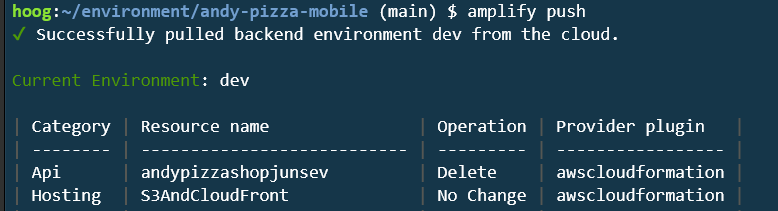
In real world scenarios, be careful when removing categories, as they can be destructive.
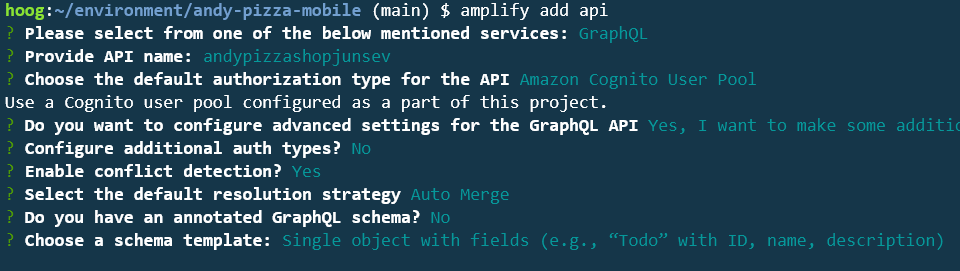
In the terminal, enter amplify add api. Choose the following settings - It is important that when you see Do you want to configure advanced settings, answer Yes, and then select Enable conflict detection. Use Auto Merge as the default.
amplify add api
Next, edit the file andy-pizza-mobile/amplify/backend/api/andypizzashopjunsev/schema.graphql and add the following schema:
type Order @model @auth(rules: [{ allow: owner }]) {
  id: ID!
  name: String!
  user: String!
  phone: AWSPhone
  email: AWSEmail
  orderDate: AWSDateTime
  orderTotal: Float!
  deliveryType: String!
  deliveryDate: AWSDateTime
  status: String!
  items: [Item] @connection(name: "OrderItems")
}
type Item @model @auth(rules: [{ allow: owner }]){
  id: ID!
  itemName: String!
  comments: String
  quantity: Int!
  size: String!
  unitPrice: Float!
  totalPrice: Float!
  orderId: ID
  order: Order @connection(name: "OrderItems")
  toppings: [Topping] @connection(name: "ItemToppings")
}
type Topping @model @auth(rules: [{ allow: owner }]){
  id: ID!
  toppingName: String!
  toppingWeight: String
  toppingSpread: String
  item: Item @connection(name: "ItemToppings")
}
type Product @model {
  id: ID!
  productId: String!
  productName: String!
  category: String!
  description: String
  defaultPrice: Float
  sizes: [Variation] @connection(name: "ProductSizes")
}
type Variation @model {
  id: ID!
  size: String!
  price: Float
  product: Product @connection(name: "ProductSizes")
}
type Comment
  @model
  @auth(
    rules: [
      { allow: groups, groups: ["storeadmins"]}
      { allow: owner  }
    ]
  ) {
  id: ID!
  comment: String!
  file: String
  status: String
}
Next, run amplify push. When asked to update your code, enter Y.
amplify push
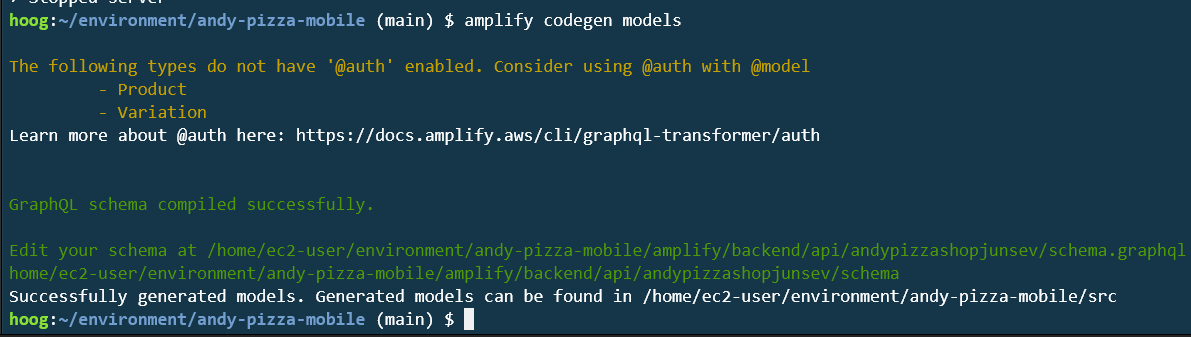
Once the update completes, in the terminal, enter amplify codegen models. This will create the necessary models based on your GraphQL (AppSync) API.
amplify codegen models
Next, open the file src/aws-exports.js and find the aws_user_pools_web_client_id value. Copy the value as you will need it for the next step:

We now need re-add our menu data, so visit the AWS AppSync console to view your AppSync API. Click on the name of your API.
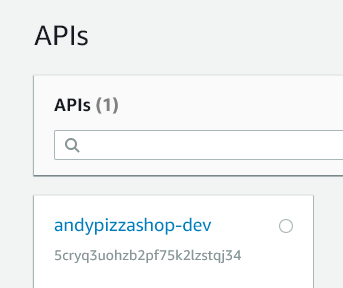
If you don’t see your API, make sure that you using the same region where you deployed your Cloud9 environment!
Select Queries from the left column, and then click Login with User Pools:
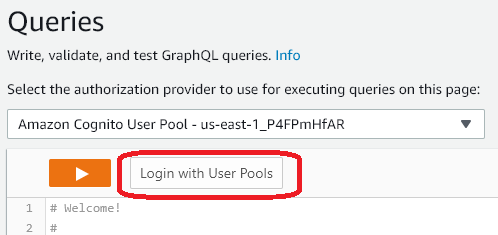
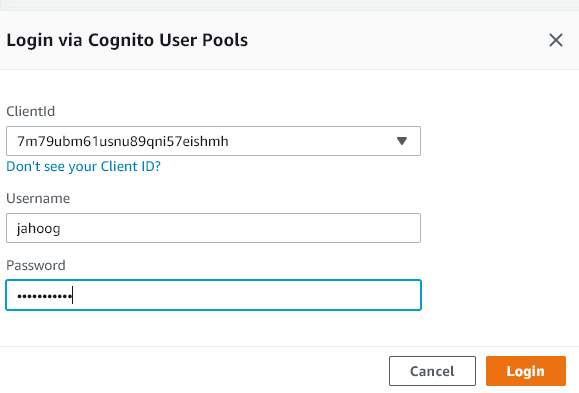
Then enter in the following values:
- ClientId: select the client id that is listed for aws_user_pools_web_client_id in aws-expors.js
- Username: the username that you entered when you registered
- Password: the password that you entered when you registered
Click Login
We need to add some product data so we don’t have an empty menu. To do this, paste in the following set of queries and then press the Orange Play button to run CreateProducts
mutation CreateProducts {
CreateProduct_0: createProduct(input: {id: "cef87f6f-acd9-4ff2-9eb3-29f97e5ee5bb",productId: "0007",productName: "Cheese Sticks",category: "SIDE",description: "Cheesey and scrupmtious, great as a side or a full meal",defaultPrice: 6}) {id}
CreateVariation_0_0: createVariation(input: {size: "Four Pack",price: 3.39,variationProductId: "cef87f6f-acd9-4ff2-9eb3-29f97e5ee5bb"}){id}
CreateVariation_0_1: createVariation(input: {size: "Dozen",price: 6.59,variationProductId: "cef87f6f-acd9-4ff2-9eb3-29f97e5ee5bb"}){id}
CreateProduct_1: createProduct(input: {id: "f635e0be-86e0-4ae0-877e-9000f4afdba7",productId: "0006",productName: "Garden Salad",category: "SIDE",description: "Fresh greens and tomatoes and cucumbers",defaultPrice: 6}) {id}
CreateVariation_1_0: createVariation(input: {size: "Half Size",price: 4.99,variationProductId: "f635e0be-86e0-4ae0-877e-9000f4afdba7"}){id}
CreateVariation_1_1: createVariation(input: {size: "Full Size",price: 7.99,variationProductId: "f635e0be-86e0-4ae0-877e-9000f4afdba7"}){id}
CreateProduct_2: createProduct(input: {id: "92d12047-5509-478f-9bde-2b1a8bed578e",productId: "0010",productName: "Lemon Lime Spritzer",category: "SIDE",description: "A fruity sode with lemon and lime",defaultPrice: 3}) {id}
CreateVariation_2_0: createVariation(input: {size: "2 Liter",price: 1.99,variationProductId: "92d12047-5509-478f-9bde-2b1a8bed578e"}){id}
CreateProduct_3: createProduct(input: {id: "d3239e2c-95e0-4d88-9dd0-286fe052bf45",productId: "0014",productName: "Magnum Club",category: "SUB",description: "This thing is loaded with beef, turkey, bacon and veggies",defaultPrice: 9}) {id}
CreateVariation_3_0: createVariation(input: {size: "Small",price: 4.99,variationProductId: "d3239e2c-95e0-4d88-9dd0-286fe052bf45"}){id}
CreateVariation_3_1: createVariation(input: {size: "Regular",price: 8.59,variationProductId: "d3239e2c-95e0-4d88-9dd0-286fe052bf45"}){id}
CreateProduct_4: createProduct(input: {id: "cffb7343-d8f3-48a5-a632-1ad39e6a189b",productId: "0002",productName: "Supreme Pizza",category: "PIZZA",description: "Just about every topping you'll need to satisfy your appetite.",defaultPrice: 10}) {id}
CreateVariation_4_0: createVariation(input: {size: "Large",price: 7.99,variationProductId: "cffb7343-d8f3-48a5-a632-1ad39e6a189b"}){id}
CreateVariation_4_1: createVariation(input: {size: "Small",price: 5.99,variationProductId: "cffb7343-d8f3-48a5-a632-1ad39e6a189b"}){id}
CreateVariation_4_2: createVariation(input: {size: "Medium",price: 6.99,variationProductId: "cffb7343-d8f3-48a5-a632-1ad39e6a189b"}){id}
CreateProduct_5: createProduct(input: {id: "c57ee325-407c-4a40-a428-c5e7b2c5338a",productId: "0015",productName: "Pizza Club",category: "SUB",description: "Pizza sauce with pepperoni and cheese, just like a pizza",defaultPrice: 8}) {id}
CreateVariation_5_0: createVariation(input: {size: "Small",price: 3.99,variationProductId: "c57ee325-407c-4a40-a428-c5e7b2c5338a"}){id}
CreateVariation_5_1: createVariation(input: {size: "Regular",price: 6.99,variationProductId: "c57ee325-407c-4a40-a428-c5e7b2c5338a"}){id}
CreateProduct_6: createProduct(input: {id: "5ccf7ec4-9318-4695-b664-59d6ce60baba",productId: "0001",productName: "Ultimate Pizza",category: "PIZZA",description: "An array of delectable toppings served piping hot on top of our classic crust.",defaultPrice: 10}) {id}
CreateVariation_6_0: createVariation(input: {size: "Medium",price: 7.59,variationProductId: "5ccf7ec4-9318-4695-b664-59d6ce60baba"}){id}
CreateVariation_6_1: createVariation(input: {size: "Small",price: 6.59,variationProductId: "5ccf7ec4-9318-4695-b664-59d6ce60baba"}){id}
CreateVariation_6_2: createVariation(input: {size: "Large",price: 8.59,variationProductId: "5ccf7ec4-9318-4695-b664-59d6ce60baba"}){id}
CreateProduct_7: createProduct(input: {id: "ae3116b4-00e7-4ac4-af35-9ebf067b1ea9",productId: "0008",productName: "Meat Lovers Pizza",category: "PIZZA",description: "There is pepperoni, and bacon, and sausage, and backon, and ham, and oh yeah, did we mention bacon?",defaultPrice: 10}) {id}
CreateVariation_7_0: createVariation(input: {size: "Large",price: 7.99,variationProductId: "ae3116b4-00e7-4ac4-af35-9ebf067b1ea9"}){id}
CreateVariation_7_1: createVariation(input: {size: "Small",price: 5.99,variationProductId: "ae3116b4-00e7-4ac4-af35-9ebf067b1ea9"}){id}
CreateVariation_7_2: createVariation(input: {size: "Medium",price: 6.99,variationProductId: "ae3116b4-00e7-4ac4-af35-9ebf067b1ea9"}){id}
CreateProduct_8: createProduct(input: {id: "0a311e6f-085e-4820-b2aa-4ec325b82772",productId: "0005",productName: "Breadsticks",category: "SIDE",description: "Hot and fresh, full of buttery flavor",defaultPrice: 5}) {id}
CreateVariation_8_0: createVariation(input: {size: "Dozen",price: 5.99,variationProductId: "0a311e6f-085e-4820-b2aa-4ec325b82772"}){id}
CreateVariation_8_1: createVariation(input: {size: "Half Dozen",price: 3.99,variationProductId: "0a311e6f-085e-4820-b2aa-4ec325b82772"}){id}
CreateProduct_9: createProduct(input: {id: "82d3c5f3-68b8-4b4f-8d0d-c10cbda9324e",productId: "0009",productName: "Regular Cola",category: "SIDE",description: "Have one of these with a smile",defaultPrice: 3}) {id}
CreateVariation_9_0: createVariation(input: {size: "2 Liter",price: 2.99,variationProductId: "82d3c5f3-68b8-4b4f-8d0d-c10cbda9324e"}){id}
CreateProduct_10: createProduct(input: {id: "92d27977-d035-4aa9-a3ae-8d063c4a7c8f",productId: "0013",productName: "Veggie Sub",category: "SUB",description: "This sub has just bread and veggies - good for you!",defaultPrice: 7}) {id}
CreateVariation_10_0: createVariation(input: {size: "Regular",price: 6.99,variationProductId: "92d27977-d035-4aa9-a3ae-8d063c4a7c8f"}){id}
CreateVariation_10_1: createVariation(input: {size: "Small",price: 3.99,variationProductId: "92d27977-d035-4aa9-a3ae-8d063c4a7c8f"}){id}
CreateProduct_11: createProduct(input: {id: "2a16a92f-ff88-457d-8347-2946ee692453",productId: "0011",productName: "Diet Cola",category: "SIDE",description: "Have one of these with a smile and no guilt",defaultPrice: 3}) {id}
CreateVariation_11_0: createVariation(input: {size: "2 Liter",price: 2.99,variationProductId: "2a16a92f-ff88-457d-8347-2946ee692453"}){id}
CreateProduct_12: createProduct(input: {id: "058081d9-9e1b-4900-9733-4a7eb21ed8bd",productId: "0004",productName: "Cheese Pizza",category: "PIZZA",description: "Mozzarella cheese, and sauce, on crust... what more do you need?",defaultPrice: 10}) {id}
CreateVariation_12_0: createVariation(input: {size: "Medium",price: 6.99,variationProductId: "058081d9-9e1b-4900-9733-4a7eb21ed8bd"}){id}
CreateVariation_12_1: createVariation(input: {size: "Large",price: 7.99,variationProductId: "058081d9-9e1b-4900-9733-4a7eb21ed8bd"}){id}
CreateVariation_12_2: createVariation(input: {size: "Small",price: 5.99,variationProductId: "058081d9-9e1b-4900-9733-4a7eb21ed8bd"}){id}
CreateProduct_13: createProduct(input: {id: "64b18436-279c-45b8-a15b-e30b02729987",productId: "0012",productName: "Andys Sub",category: "SUB",description: "Andy Classic Sub, with turkey and bacon and tomatoes and mayo",defaultPrice: 8}) {id}
CreateVariation_13_0: createVariation(input: {size: "Small",price: 4.99,variationProductId: "64b18436-279c-45b8-a15b-e30b02729987"}){id}
CreateVariation_13_1: createVariation(input: {size: "Regular",price: 7.99,variationProductId: "64b18436-279c-45b8-a15b-e30b02729987"}){id}
CreateProduct_14: createProduct(input: {id: "4c4442f6-41cc-456c-a41b-c57b8680a30a",productId: "0003",productName: "Veggie Supreme",category: "PIZZA",description: "Well, it's just vegetables.",defaultPrice: 10}) {id}
CreateVariation_14_0: createVariation(input: {size: "Medium",price: 6.99,variationProductId: "4c4442f6-41cc-456c-a41b-c57b8680a30a"}){id}
CreateVariation_14_1: createVariation(input: {size: "Large",price: 7.99,variationProductId: "4c4442f6-41cc-456c-a41b-c57b8680a30a"}){id}
CreateVariation_14_2: createVariation(input: {size: "Small",price: 5.99,variationProductId: "4c4442f6-41cc-456c-a41b-c57b8680a30a"}){id}
CreateProduct_15: createProduct(input: {id: "3b16a92f-ff88-457d-8347-2946ee692453",productId: "0016",productName: "Choco Cake",category: "SIDE",description: "Chocolate mixed in with chocolate, and cake, and topped with chocoloate",defaultPrice: 5}) {id}
CreateVariation_15_0: createVariation(input: {size: "Regular",price: 5.99,variationProductId: "3b16a92f-ff88-457d-8347-2946ee692453"}){id}
CreateProduct_16: createProduct(input: {id: "4c16a92f-ff88-457d-8347-2946ee692453",productId: "0017",productName: "Vanilla Bean Pudding",category: "SIDE",description: "A light, fluffy dessert filled with vanilla cream flavoring and topped with cinnamon",defaultPrice: 5}) {id}
CreateVariation_16_0: createVariation(input: {size: "Regular",price: 5.99,variationProductId: "4c16a92f-ff88-457d-8347-2946ee692453"}){id}
CreateProduct_17: createProduct(input: {id: "5d16a92f-ff88-457d-8347-2946ee692453",productId: "0018",productName: "Carryover Cafe Brownies",category: "SIDE",description: "Brownies infused with caramel and chocolate chips",defaultPrice: 5}) {id}
CreateVariation_17_0: createVariation(input: {size: "Regular",price: 6.49,variationProductId: "5d16a92f-ff88-457d-8347-2946ee692453"}){id}
}
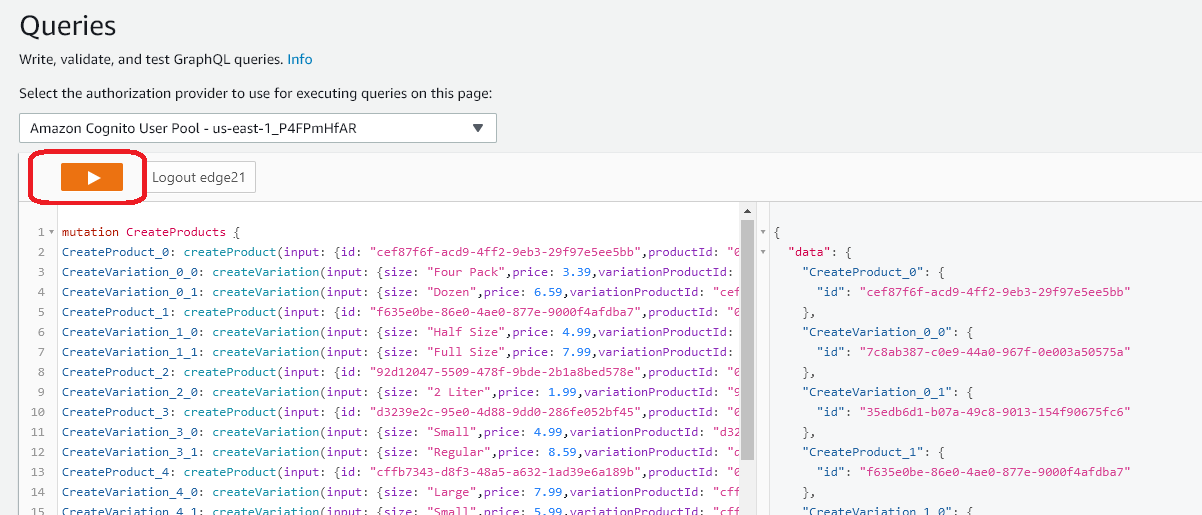
This will load our initial product data - you should see successful logs in the right hand column of the AppSync query console.
Return to Cloud9. DataStore allows us to perform data operations locally in the client. To do this, we are going to switch out some of our code to use DataStore APIs instead of API.graphqlOperation APIs. Replace App.js code with the following:
import React, {Component} from 'react';
import { StyleSheet, Text, View, TouchableOpacity } from 'react-native';
import { Button, Container, Header, Footer, Tab, Tabs, DefaultTabBar, List, ListItem, Icon, Left, Right, Accordion, Thumbnail } from 'native-base';
import Amplify, {Auth, Hub, Cache, API, graphqlOperation, Analytics, DataStore} from 'aws-amplify'
import { createOrder, createItem, updateOrder,  createReview, createReviewPhrase } from "./src/graphql/mutations";
import awsconfig from "./src/aws-exports";
import { withAuthenticator, ChatBot } from 'aws-amplify-react-native';
import { Item, Order } from "./src/models";

Amplify.configure(awsconfig);
Amplify.configure({Analytics: { disabled: true }});
DataStore.configure({
  errorHandler: (error) => {
    console.warn("Unrecoverable error", { error });
  },
});

class App extends Component {
  state = {
    currentUser: "",
    menuLoaded: false,
    currentOrder: null
  }

  isRecommended(pid) {
    if (this.state.recommendations) {
      var firstResult = this.state.recommendations[0];
      if (firstResult) {
        if (firstResult.productId === pid)
         return <Icon name="star" style={{ fontSize: 15, color: "#ffff00", lineHeight: 20 }}/>;
      }
    }
    return "";
  }
    loadCurrentUser() {
    Auth.currentAuthenticatedUser().then(userInfo => {
      this.setState({
        loggedIn: true,
        currentUser: userInfo.username,
        currentUserData: userInfo
      });
    });
  }

    loadRecommendations() {
    // Get recommendation

    const getRecos = `
    query getRecos {
      getRecommendations(filter: {
        userId: {
          eq: "${this.state.currentUser}"
        }
      }) {
        items {
          itemId
          userId
          priority
        }
      }
    }
    `;
    API.graphql(graphqlOperation(getRecos))
      .then(result => {
        var firstResult = result.data.getRecommendations.items[0];
        var filterResult = this.state.menuItems.filter(
          myItem => myItem.productId === firstResult.itemId
        );
        this.setState({
          recommendedItems: result.data.getRecommendations.items,
          recommendations: filterResult
        });
      })
      .catch(err => {
        console.log("RECO ERR", err);
      });

  }

  loadMenuItems() {

        // Get menu items
    const limit = {
      limit: 100
    };

    API.graphql(graphqlOperation(this.listProductsWithVariant, limit)).then(result => {
      this.setState({
        menuItems: result.data.listProducts.items,
        menuLoaded: true
      });

    });

  }

   async fetchOrders() {
     const orders = await DataStore.query(Order);
   }

  componentDidMount() {

    this.loadCurrentUser();
  this.loadMenuItems();

  //DataStore.clear();
  //DataStore.observe(Order).subscribe(() => this.fetchOrders());
  }

    listProductsWithVariant = `query ListProducts(
    $filter: ModelProductFilterInput
    $limit: Int
    $nextToken: String
  ) {
    listProducts(filter: $filter, limit: $limit, nextToken: $nextToken) {
      items {
        id
        productId
        productName
        category
        description
        defaultPrice
        sizes {
            items {
              id
              price
              size
            }
          }
      }
      nextToken
    }
  }
  `;

  async loadExistingOrder(orderId) {
    const getOrderWithItems = `query GetOrder($id: ID!) {
      getOrder(id: $id) {
        id
        name
        user
        phone
        email
        orderDate
        orderTotal
        deliveryType
        deliveryDate
        status
        items {
          items {
            id
            itemName
            comments
            quantity
            size
            unitPrice
            totalPrice
          }
          nextToken
        }
      }
    }
    `;
    // Now we want to update the state with the new order data
    const orderInput = {
      id: orderId
    };

    /*const getOrderResult = await API.graphql(
      graphqlOperation(getOrderWithItems, orderInput)
    );*/
    const getOrderResult = await DataStore.query(Order, orderId);
    this.setState({
      currentOrder: getOrderResult
    });
  }

  createNewItem = async itemInput => {
    /*
    const newItem = await API.graphql(
      graphqlOperation(createItem, {
        input: itemInput
      })
    );*/
    const newItem = await DataStore.save(
      new Item( {
        itemName: itemInput.itemName,
        comments: itemInput.comments,
        quantity: itemInput.quantity,
        size: itemInput.size,
        unitPrice: itemInput.unitPrice,
        totalPrice: itemInput.totalPrice,
        itemOrderId: itemInput.itemOrderId,
        order: itemInput.order,
        orderId: itemInput.order.id
      }));
    return newItem;
  };

  async getCurrentItems() {

  }
  createNewOrder = async orderInput => {
    /*const newOrder = await API.graphql(
      graphqlOperation(createOrder, {
        input: orderInput
      })
    );*/
    const newOrder = await DataStore.save(
      new Order({
        name: orderInput.name,
        user: orderInput.user,
        phone: orderInput.phone,
        email: orderInput.email,
        orderDate: orderInput.orderDate,
        orderTotal: orderInput.orderTotal,
        deliveryType: orderInput.deliveryType,
        deliveryDate: orderInput.deliveryDate,
        status: orderInput.status
      }))
    return newOrder;
  };

  getTotalFloat = items => {
    var totalPrice = 0;
    for (var i in items) {
      var qty = items[i]["quantity"];
      var price = items[i]["unitPrice"];
      var qtyPrice = qty * price;
      totalPrice += qtyPrice;
    }
    return totalPrice;
  };

  getTotal = items => {
    var totalPrice = 0;
    for (var i in items) {
      var qty = items[i]["quantity"];
      var price = items[i]["unitPrice"];
      var qtyPrice = qty * price;
      totalPrice += qtyPrice;
    }
    return totalPrice.toFixed(2);
  };


  appendLeadingZeroes = n => {
    if (n <= 9) {
      return "0" + n;
    }
    return n;
  };

  createOrderName(today) {
    return (
      today.getFullYear() +
      "-" +
      this.appendLeadingZeroes(today.getMonth() + 1) +
      "-" +
      this.appendLeadingZeroes(today.getDate())
    );
  }

  getOrderDate(today) {
    return (
      today.getFullYear() +
      "-" +
      this.appendLeadingZeroes(today.getMonth() + 1) +
      "-" +
      this.appendLeadingZeroes(today.getDate()) +
      "T" +
      this.appendLeadingZeroes(today.getHours()) +
      ":" +
      this.appendLeadingZeroes(today.getMinutes()) +
      ":" +
      this.appendLeadingZeroes(today.getSeconds()) +
      "-05:00:00"
    );
  }

  async createNewOrderConstruct() {
    var today = new Date();
    var orderName = this.createOrderName(today);
    var orderDate = this.getOrderDate(today);

    const orderInput = {
      name: "ORDER: " + orderName,
      user: this.state.currentUser,
      phone: this.state.currentUserData.attributes.phone_number,
      email: this.state.currentUserData.attributes.email,
      orderDate: orderDate,
      orderTotal: this.getTotalFloat(this.state.currentOrder),
      deliveryType: "Carryout",
      deliveryDate: orderDate,
      status: "IN PROGRESS"
    };

    const newOrder = await this.createNewOrder(orderInput);
    return newOrder;
  }

addItemToCart = async (item, comments) => {

  await DataStore.start();

    var checkOrder = this.state.currentOrder;
    if (!checkOrder) {
      // Create new order
      //var cUser = await Auth.currentAuthenticatedUser();
      var today = new Date();
      const expiration = new Date(today.getTime() + 60 * 60000);
      var newOrder = await this.createNewOrderConstruct();
      Cache.setItem("currentOrder", newOrder.id, {
        priority: 3,
        expires: expiration.getTime()
      });
      checkOrder = newOrder;
    }
    var currentOrderId = checkOrder.id;

    const totalPrice = item.quantity * item.price;
    const itemInput = {
      itemName: item.itemName,
      comments: comments,
      quantity: item.quantity,
      size: item.size,
      unitPrice: item.price,
      totalPrice: totalPrice,
      itemOrderId: currentOrderId,
      order: checkOrder,
      orderId: checkOrder.id
    };
    const newItem = await this.createNewItem(itemInput);
    const sourceType = "menu";
    if (itemInput.sourceType)
      sourceType = itemInput.sourceType;
    const analyticsRecord = { name: 'ADD_ITEM', attributes: { SOURCE: sourceType, PRODUCT_ID: item.itemId, ITEM_NAME: item.itemName,  ITEM_CATEGORY: item.category, SIZE: item.size, ORDER: currentOrderId, USER: this.state.currentUser }, metrics: { QUANTITY: item.quantity, TOTAL_PRICE: totalPrice, UNIT_PRICE: item.price}};
    Analytics.record(analyticsRecord);
    this.loadExistingOrder(currentOrderId);
    const items = await DataStore.query(Item, i => i.orderId("eq", checkOrder.id));
    this.setState({currentCartItems: items});

  alert('Added ' + item.itemName + ' to cart');
}

 addProduct(item, size) {
            const itemInput = {
              itemName: item.productName,
              itemId: item.productId,
              size: size.size,
              price: size.price,
              quantity: 1,
              category: item.category
            }
            this.addItemToCart(itemInput, "Ordered from menu");
  }


  _renderHeader(item, expanded) {
    return (
      <View style={{
        flexDirection: "row",
        padding: 10,
        justifyContent: "space-between",
        alignItems: "center" ,
        backgroundColor: "#A9DAD6" }}>
      <Text style={{ fontWeight: "600" }}>
          <Text></Text>
          {" "}{item.productName}
        </Text>
        {expanded
          ? <Icon style={{ fontSize: 18 }} name="remove-circle" />
          : <Icon style={{ fontSize: 18 }} name="add-circle" />}
      </View>
    );
  }
  _renderContent(item, item2) {
    return (
      <View>
      <Text
        style={{
          backgroundColor: "#e3f1f1",
          padding: 10,
          fontStyle: "italic",
        }}
      >
        {item.description}
      </Text>
      <List>
      {
       item.sizes.items.map(size => (
       <ListItem key={size.id}>
        <Left><Text>{size.size} - ${size.price.toString()}</Text></Left>
        <Right>
         <Button onPress={() => this.addProduct(item, size)}>
             <Icon name='ios-add-circle' />
         </Button>
        </Right>
      </ListItem>
       )
       )
      }
      </List>
      </View>
    );
  }

  getPrice(item) {
    return "$" + item.totalPrice.toString();
  }
  getName(item) {
    return item.itemName + "(" + item.quantity.toString() + ")"
  }
  getCartQty() {
    var retText = "Cart";

    if (this.state.currentOrder)
    {
      const items = this.state.currentCartItems;
      retText = "Cart";
      if (items) {
        retText = "Cart (" + items.length.toString() + ")"
      }
    }
    return retText;
  }

  chatItemHelper(specialty) {
    var specLower = ""
    if (specialty)
      specLower = specialty.toLowerCase();
    switch (specLower) {
      case "supreme":
        return "0002";
      case "ultimate":
        return "0001";
      case "veggie":
        return "0003";
      case "meat lovers":
        return "0008";
      default:
        return "0004";
    }
  }

  getPriceForSize(pId, selSize) {
    const retVal = this.state.menuItems.filter(item => item.productId === pId);
    const rVal2 = retVal[0].sizes.items.filter(
      item2 => item2.size.toUpperCase() === selSize.toUpperCase()
    );
    return rVal2[0].price;
  }

  handleComplete(err, confirmation) {
    if (err) {
      console.log("Bot conversation failed");
      return;
    }

    var pid = this.chatItemHelper(confirmation.slots.specialty);
    var price = this.getPriceForSize(pid, confirmation.slots.size);
    var specName = confirmation.slots.specialty;
    if (!specName) specName = "Cheese Pizza";
    var item = {
      itemName: specName,
      quantity: 1,
      price: price,
      size: confirmation.slots.size,
      itemId: pid,
      category: "PIZZA"
    };
    this.addItemToCart(item, "Ordered from Chatbot");
    return "Great, I am adding that to your order!";
  }

  completeOrder = () => {
    const totalPrice = this.getTotal(this.state.currentCartItems);
    const totalPriceFloat = this.getTotalFloat(this.state.currentCartItems);
    const totalItems = this.state.currentCartItems.length;
    const orderInput = {
      id: this.state.currentOrder.id,
      name: this.state.currentOrder.name,
      user: this.state.currentUser,
      phone: this.state.currentOrder.phone,
      email: this.state.currentOrder.email,
      orderDate: this.state.currentOrder.orderDate,
      orderTotal: totalPrice,
      deliveryType: "Carryout",
      deliveryDate: this.state.currentOrder.deliveryDate,
      status: "COMPLETE"
    };

    const analyticsRecord = { name: 'COMPLETE_ORDER', attributes: { SOURCE: "checkout", ORDER_TYPE: "Carryout", ORDER: this.state.currentOrder.id, USER: this.state.currentUser }, metrics: { QUANTITY: totalItems, TOTAL_PRICE: totalPriceFloat}};
    Analytics.record(analyticsRecord);

    API.graphql(
      graphqlOperation(updateOrder, {
        input: orderInput
      })
    ).then(result => {
      this.setState({
        currentOrder: null
      });
      Cache.removeItem("currentOrder");
    });

    alert('Your order is complete and on its way!');

  };

renderTabBar = (props) => {
  props.tabStyle = Object.create(props.tabStyle);
  return <DefaultTabBar {...props} />;
};

  render() {
  return (
      <Container>

        <Header hasTabs>
         <Text>Welcome to Andy's Mobile</Text>
         <Thumbnail source={{uri: 'https://jah-lex-workshop-2018.s3.amazonaws.com/mob302/images/0001.png'}} />
        </Header>
        <Tabs renderTabBar={this.renderTabBar}>
          <Tab heading="Menu">


                    { this.state.menuLoaded ?

  <Accordion dataArray={this.state.menuItems} expanded={[0]}
                                renderHeader={this._renderHeader.bind(this)}
            renderContent={this._renderContent.bind(this)}
                    >
                    </Accordion>
                    : null
                    }

          </Tab>
          <Tab heading={this.getCartQty()}>

                    { this.state.currentCartItems ?

                    <List>
                     {this.state.currentCartItems.map(item => (
                      <ListItem key={item.id} button selected >
                       <Left>
                        <Text>{this.getName(item)}</Text>
                       </Left>
                       <Right>
                        <Text>{this.getPrice(item)}</Text>
                       </Right>
                      </ListItem>
                     )
                     )
                     }
                     <ListItem key="total">
                      <Left><Text>Total</Text></Left>
                      <Right><Text>{this.getTotal(this.state.currentCartItems)}</Text></Right>
                     </ListItem>
                    <ListItem key="complete">
                      <Button primary style={{padding: 10}} onPress={this.completeOrder.bind(this)}>
                       <Text style={{color: '#ffffff'}} >Complete</Text>
                      </Button>
                    </ListItem>
                    </List>
                    : <Text>No Current Items</Text>
                    }
          </Tab>
        </Tabs>
        <Footer>
          <Text>Andy's Mobile... Workshop 2021</Text>
        </Footer>
      </Container>
  );
  }
}
export default withAuthenticator(App);

const styles = StyleSheet.create({
  container: {
    flex: 1,
    backgroundColor: '#fff',
    alignItems: 'center',
    justifyContent: 'center',
  },
  button: {
    backgroundColor: "#99AAFF",
    borderRadius: 5,
    borderWidth: 1,
    borderColor: "#0000CC"
  }
});
We have switched out adding to our cart with the DataStore apis rather than the graphQL direct APIs.
The difference in the code looks like this:
- Previous code for adding data to the cart:
–
const newItem = await API.graphql(graphqlOperation(createItem, { input: itemInput})); - New code for adding data to the cart, using the DataStore API:
–
const newItem = await DataStore.save( new Item( ... itemObject ...));
The Item object is the strongly type interface that was created using amplify codegen models
Restart the expo server:
export env REACT_NATIVE_PACKAGER_HOSTNAME=127.0.0.1 && expo start --tunnel
Once the expo server starts, you can reload the Expo App on your mobile device. If you add menu items to the cart, it will function just as previous:
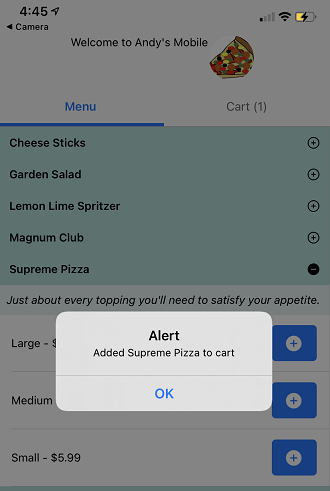
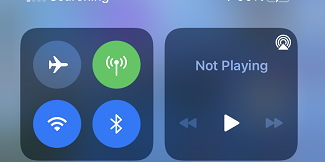
However, the point to this exercise to allow us to add items to the cart even if our connectivity is lost for a bit. To test this, we can remove network connectivity from our mobile device, but continue to add items to the cart.
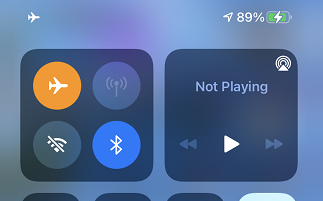
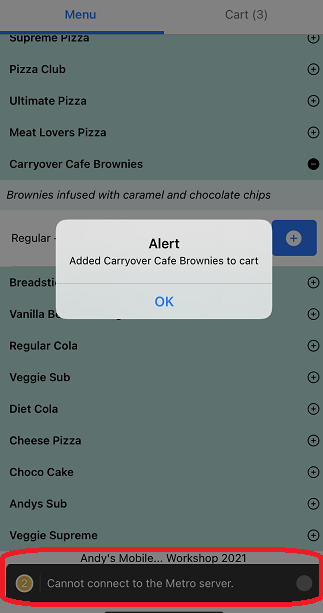
Once you remove network connectivity, you can continue to add items to the cart.
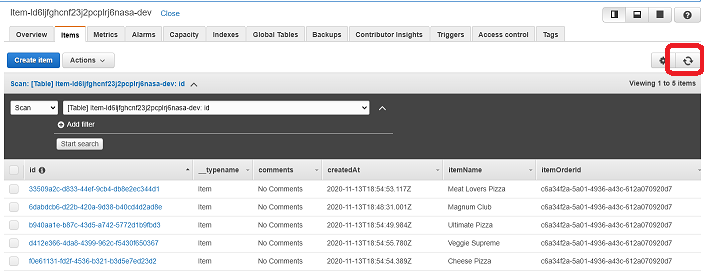
If you view the Items table in the Dynamo DB Console, you’ll notice that no new items appear in the backend datasource.
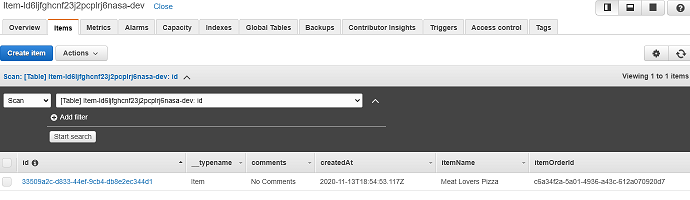
These will continue to be stored in the local data store until network connectivity is restored. Let’s restore connectivity on our device.
Once you restore, the data will sync again. An easy way to see this occur is to look at the back-end DynamoDB tables that support your AppSync API. If you check the Item table, it should start to populate the items that you added during the network disconnection.
At this point, you can checkout and receive your order!
Workshop Complete!
Thank you for completing the React/Native Workshop!