Adding backend data services
Adding APIs and data
Using Amplify, we are going to deploy an AWS AppSync API.
There are many features and benefits of AppSync and GraphQL. These are not covered in this workshop, but you can learn more at https://aws.amazon.com/appsync/ and https://docs.aws.amazon.com/appsync/latest/devguide/designing-a-graphql-api.html
In the terminal, run the following command to add an API:
amplify add api
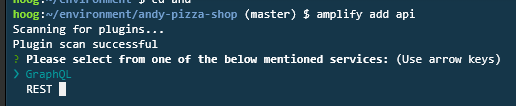
Choose GraphQL, and enter the API name as andypizzashop:

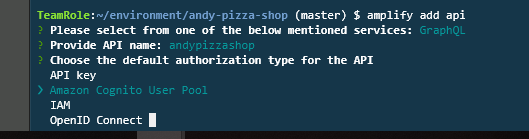
Choose Amazon Cognito User Pool. This will enforce security in our application by requiring the user to have authenticated before adding items in our API.
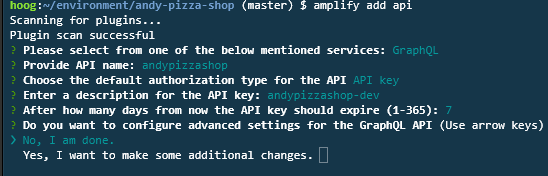
Enter No I am done when prompted for additional changes
Choose N for annotated GraphQL Schema and Objects with fine-grained access control for the schema template. Choose N when asked to edit the file now, and press enter. This will create a sample schema, although we will replace that with our own schema file.
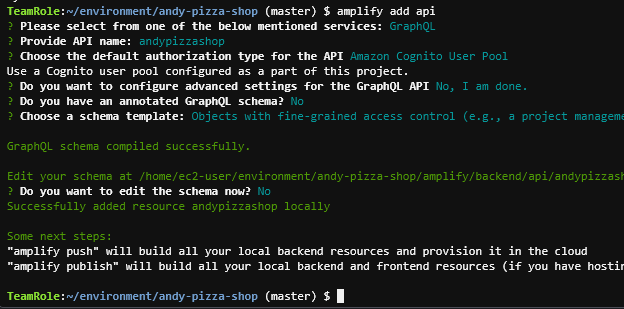
Notice the location of the schema file that Amplify created. This is the schema definition that amplify will use to create the AppSync schema. To edit this, you can click the file location and it will open a context menu where you can select Open
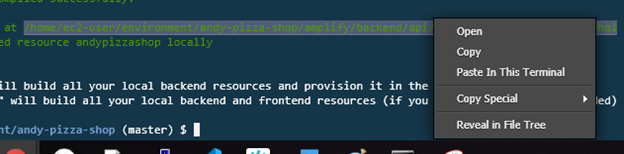
Replace the schema in schema.graphql with the following code and save schema.graphql:
type Order @model @auth(rules: [{ allow: owner }]) {
  id: ID!
  name: String!
  user: String!
  phone: AWSPhone
  email: AWSEmail
  orderDate: AWSDateTime
  orderTotal: Float!
  deliveryType: String!
  deliveryDate: AWSDateTime
  status: String!
  items: [Item] @connection(name: "OrderItems")
}
type Item @model @auth(rules: [{ allow: owner }]){
  id: ID!
  itemName: String!
  comments: String
  quantity: Int!
  size: String!
  unitPrice: Float!
  totalPrice: Float!
  order: Order @connection(name: "OrderItems")
  toppings: [Topping] @connection(name: "ItemToppings")
}
type Topping @model @auth(rules: [{ allow: owner }]){
  id: ID!
  toppingName: String!
  toppingWeight: String
  toppingSpread: String
  item: Item @connection(name: "ItemToppings")
}
type Product @model {
  id: ID!
  productId: String!
  productName: String!
  category: String!
  description: String
  defaultPrice: Float
  sizes: [Variation] @connection(name: "ProductSizes")
}
type Variation @model {
  id: ID!
  size: String!
  price: Float
  product: Product @connection(name: "ProductSizes")
}
Notice the @ signs in this schema? The Amplify framework supports these GraphQL annotations - which are directives that tell amplify to configure our AppSync API in a certain way:
@model - creates the data model using DynamoDB
@connection - creates relationship between types
@auth - creates fields identifying access control and the appropriate query controls
To learn more about these, check out GraphQL Directives for AppSync
Make sure you save the schema.graphql file and then run the following to push our changes into AWS.
amplify push
Leave the default responses for the next set of questions.

Once you get through all the questions, deployment will start. This will take a few minutes.
If you are bored, you can take some time to think about what is being provisioned here. Although Amplify makes it seem simple, it is not trivial: Amplify is deploying the schema, the backend Dynamo DB tables, the AppSync resolvers (using Velocity Templates), and the AppSync authentication integration with Cognito. We are not going to get into what all of this is in this workshop, but it is very powerful.
Once complete, you will receive the GraphQL endpoint information in the terminal window. This endpoint is now accessible by an authenticated user.
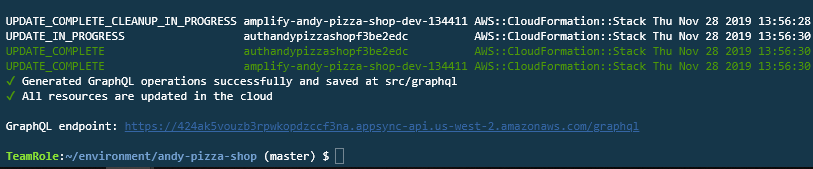
Next, open the file src/aws-exports.js and find the aws_user_pools_web_client_id value. Copy the value as you will need it for the next step:

Now visit the AWS AppSync console to view your AppSync API. Click on the name of your API.
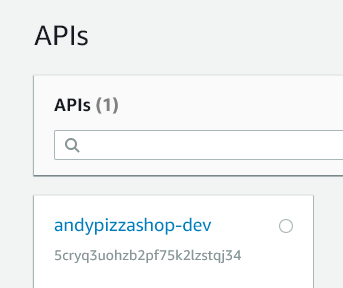
If you don’t see your API, make sure that you using the same region where you deployed your Cloud9 environment!
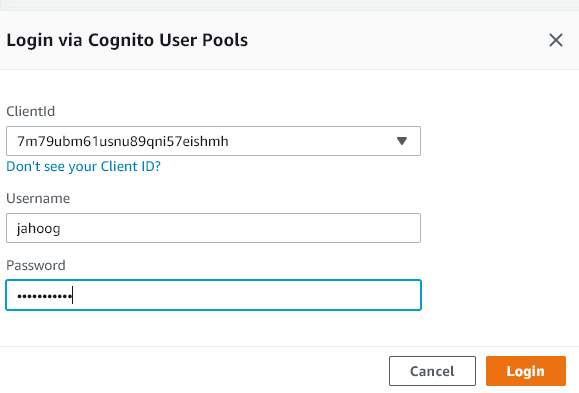
Select Queries from the left column, and then click Login with User Pools:
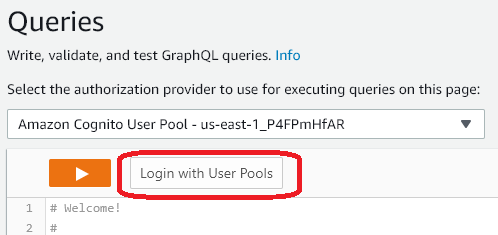
Then enter in the following values:
- ClientId: select the client id that is listed for aws_user_pools_web_client_id in aws-expors.js
- Username: the username that you entered when you registered
- Password: the password that you entered when you registered
Click Login
We need to add some product data so we don’t have an empty menu. To do this, paste in the following set of queries and then press the Orange Play button to run CreateProducts
mutation CreateProducts {
CreateProduct_0: createProduct(input: {id: "cef87f6f-acd9-4ff2-9eb3-29f97e5ee5bb",productId: "0007",productName: "Cheese Sticks",category: "SIDE",description: "Cheesey and scrupmtious, great as a side or a full meal",defaultPrice: 6}) {id}
CreateVariation_0_0: createVariation(input: {size: "Four Pack",price: 3.39,variationProductId: "cef87f6f-acd9-4ff2-9eb3-29f97e5ee5bb"}){id}
CreateVariation_0_1: createVariation(input: {size: "Dozen",price: 6.59,variationProductId: "cef87f6f-acd9-4ff2-9eb3-29f97e5ee5bb"}){id}
CreateProduct_1: createProduct(input: {id: "f635e0be-86e0-4ae0-877e-9000f4afdba7",productId: "0006",productName: "Garden Salad",category: "SIDE",description: "Fresh greens and tomatoes and cucumbers",defaultPrice: 6}) {id}
CreateVariation_1_0: createVariation(input: {size: "Half Size",price: 4.99,variationProductId: "f635e0be-86e0-4ae0-877e-9000f4afdba7"}){id}
CreateVariation_1_1: createVariation(input: {size: "Full Size",price: 7.99,variationProductId: "f635e0be-86e0-4ae0-877e-9000f4afdba7"}){id}
CreateProduct_2: createProduct(input: {id: "92d12047-5509-478f-9bde-2b1a8bed578e",productId: "0010",productName: "Lemon Lime Spritzer",category: "SIDE",description: "A fruity sode with lemon and lime",defaultPrice: 3}) {id}
CreateVariation_2_0: createVariation(input: {size: "2 Liter",price: 1.99,variationProductId: "92d12047-5509-478f-9bde-2b1a8bed578e"}){id}
CreateProduct_3: createProduct(input: {id: "d3239e2c-95e0-4d88-9dd0-286fe052bf45",productId: "0014",productName: "Magnum Club",category: "SUB",description: "This thing is loaded with beef, turkey, bacon and veggies",defaultPrice: 9}) {id}
CreateVariation_3_0: createVariation(input: {size: "Small",price: 4.99,variationProductId: "d3239e2c-95e0-4d88-9dd0-286fe052bf45"}){id}
CreateVariation_3_1: createVariation(input: {size: "Regular",price: 8.59,variationProductId: "d3239e2c-95e0-4d88-9dd0-286fe052bf45"}){id}
CreateProduct_4: createProduct(input: {id: "cffb7343-d8f3-48a5-a632-1ad39e6a189b",productId: "0002",productName: "Supreme Pizza",category: "PIZZA",description: "Just about every topping you'll need to satisfy your appetite.",defaultPrice: 10}) {id}
CreateVariation_4_0: createVariation(input: {size: "Large",price: 7.99,variationProductId: "cffb7343-d8f3-48a5-a632-1ad39e6a189b"}){id}
CreateVariation_4_1: createVariation(input: {size: "Small",price: 5.99,variationProductId: "cffb7343-d8f3-48a5-a632-1ad39e6a189b"}){id}
CreateVariation_4_2: createVariation(input: {size: "Medium",price: 6.99,variationProductId: "cffb7343-d8f3-48a5-a632-1ad39e6a189b"}){id}
CreateProduct_5: createProduct(input: {id: "c57ee325-407c-4a40-a428-c5e7b2c5338a",productId: "0015",productName: "Pizza Club",category: "SUB",description: "Pizza sauce with pepperoni and cheese, just like a pizza",defaultPrice: 8}) {id}
CreateVariation_5_0: createVariation(input: {size: "Small",price: 3.99,variationProductId: "c57ee325-407c-4a40-a428-c5e7b2c5338a"}){id}
CreateVariation_5_1: createVariation(input: {size: "Regular",price: 6.99,variationProductId: "c57ee325-407c-4a40-a428-c5e7b2c5338a"}){id}
CreateProduct_6: createProduct(input: {id: "5ccf7ec4-9318-4695-b664-59d6ce60baba",productId: "0001",productName: "Ultimate Pizza",category: "PIZZA",description: "An array of delectable toppings served piping hot on top of our classic crust.",defaultPrice: 10}) {id}
CreateVariation_6_0: createVariation(input: {size: "Medium",price: 7.59,variationProductId: "5ccf7ec4-9318-4695-b664-59d6ce60baba"}){id}
CreateVariation_6_1: createVariation(input: {size: "Small",price: 6.59,variationProductId: "5ccf7ec4-9318-4695-b664-59d6ce60baba"}){id}
CreateVariation_6_2: createVariation(input: {size: "Large",price: 8.59,variationProductId: "5ccf7ec4-9318-4695-b664-59d6ce60baba"}){id}
CreateProduct_7: createProduct(input: {id: "ae3116b4-00e7-4ac4-af35-9ebf067b1ea9",productId: "0008",productName: "Meat Lovers Pizza",category: "PIZZA",description: "There is pepperoni, and bacon, and sausage, and backon, and ham, and oh yeah, did we mention bacon?",defaultPrice: 10}) {id}
CreateVariation_7_0: createVariation(input: {size: "Large",price: 7.99,variationProductId: "ae3116b4-00e7-4ac4-af35-9ebf067b1ea9"}){id}
CreateVariation_7_1: createVariation(input: {size: "Small",price: 5.99,variationProductId: "ae3116b4-00e7-4ac4-af35-9ebf067b1ea9"}){id}
CreateVariation_7_2: createVariation(input: {size: "Medium",price: 6.99,variationProductId: "ae3116b4-00e7-4ac4-af35-9ebf067b1ea9"}){id}
CreateProduct_8: createProduct(input: {id: "0a311e6f-085e-4820-b2aa-4ec325b82772",productId: "0005",productName: "Breadsticks",category: "SIDE",description: "Hot and fresh, full of buttery flavor",defaultPrice: 5}) {id}
CreateVariation_8_0: createVariation(input: {size: "Dozen",price: 5.99,variationProductId: "0a311e6f-085e-4820-b2aa-4ec325b82772"}){id}
CreateVariation_8_1: createVariation(input: {size: "Half Dozen",price: 3.99,variationProductId: "0a311e6f-085e-4820-b2aa-4ec325b82772"}){id}
CreateProduct_9: createProduct(input: {id: "82d3c5f3-68b8-4b4f-8d0d-c10cbda9324e",productId: "0009",productName: "Regular Cola",category: "SIDE",description: "Have one of these with a smile",defaultPrice: 3}) {id}
CreateVariation_9_0: createVariation(input: {size: "2 Liter",price: 2.99,variationProductId: "82d3c5f3-68b8-4b4f-8d0d-c10cbda9324e"}){id}
CreateProduct_10: createProduct(input: {id: "92d27977-d035-4aa9-a3ae-8d063c4a7c8f",productId: "0013",productName: "Veggie Sub",category: "SUB",description: "This sub has just bread and veggies - good for you!",defaultPrice: 7}) {id}
CreateVariation_10_0: createVariation(input: {size: "Regular",price: 6.99,variationProductId: "92d27977-d035-4aa9-a3ae-8d063c4a7c8f"}){id}
CreateVariation_10_1: createVariation(input: {size: "Small",price: 3.99,variationProductId: "92d27977-d035-4aa9-a3ae-8d063c4a7c8f"}){id}
CreateProduct_11: createProduct(input: {id: "2a16a92f-ff88-457d-8347-2946ee692453",productId: "0011",productName: "Diet Cola",category: "SIDE",description: "Have one of these with a smile and no guilt",defaultPrice: 3}) {id}
CreateVariation_11_0: createVariation(input: {size: "2 Liter",price: 2.99,variationProductId: "2a16a92f-ff88-457d-8347-2946ee692453"}){id}
CreateProduct_12: createProduct(input: {id: "058081d9-9e1b-4900-9733-4a7eb21ed8bd",productId: "0004",productName: "Cheese Pizza",category: "PIZZA",description: "Mozzarella cheese, and sauce, on crust... what more do you need?",defaultPrice: 10}) {id}
CreateVariation_12_0: createVariation(input: {size: "Medium",price: 6.99,variationProductId: "058081d9-9e1b-4900-9733-4a7eb21ed8bd"}){id}
CreateVariation_12_1: createVariation(input: {size: "Large",price: 7.99,variationProductId: "058081d9-9e1b-4900-9733-4a7eb21ed8bd"}){id}
CreateVariation_12_2: createVariation(input: {size: "Small",price: 5.99,variationProductId: "058081d9-9e1b-4900-9733-4a7eb21ed8bd"}){id}
CreateProduct_13: createProduct(input: {id: "64b18436-279c-45b8-a15b-e30b02729987",productId: "0012",productName: "Andys Sub",category: "SUB",description: "Andy Classic Sub, with turkey and bacon and tomatoes and mayo",defaultPrice: 8}) {id}
CreateVariation_13_0: createVariation(input: {size: "Small",price: 4.99,variationProductId: "64b18436-279c-45b8-a15b-e30b02729987"}){id}
CreateVariation_13_1: createVariation(input: {size: "Regular",price: 7.99,variationProductId: "64b18436-279c-45b8-a15b-e30b02729987"}){id}
CreateProduct_14: createProduct(input: {id: "4c4442f6-41cc-456c-a41b-c57b8680a30a",productId: "0003",productName: "Veggie Supreme",category: "PIZZA",description: "Well, it's just vegetables.",defaultPrice: 10}) {id}
CreateVariation_14_0: createVariation(input: {size: "Medium",price: 6.99,variationProductId: "4c4442f6-41cc-456c-a41b-c57b8680a30a"}){id}
CreateVariation_14_1: createVariation(input: {size: "Large",price: 7.99,variationProductId: "4c4442f6-41cc-456c-a41b-c57b8680a30a"}){id}
CreateVariation_14_2: createVariation(input: {size: "Small",price: 5.99,variationProductId: "4c4442f6-41cc-456c-a41b-c57b8680a30a"}){id}
CreateProduct_15: createProduct(input: {id: "3b16a92f-ff88-457d-8347-2946ee692453",productId: "0016",productName: "Choco Cake",category: "SIDE",description: "Chocolate mixed in with chocolate, and cake, and topped with chocoloate",defaultPrice: 5}) {id}
CreateVariation_15_0: createVariation(input: {size: "Regular",price: 5.99,variationProductId: "3b16a92f-ff88-457d-8347-2946ee692453"}){id}
CreateProduct_16: createProduct(input: {id: "4c16a92f-ff88-457d-8347-2946ee692453",productId: "0017",productName: "Vanilla Bean Pudding",category: "SIDE",description: "A light, fluffy dessert filled with vanilla cream flavoring and topped with cinnamon",defaultPrice: 5}) {id}
CreateVariation_16_0: createVariation(input: {size: "Regular",price: 5.99,variationProductId: "4c16a92f-ff88-457d-8347-2946ee692453"}){id}
CreateProduct_17: createProduct(input: {id: "5d16a92f-ff88-457d-8347-2946ee692453",productId: "0018",productName: "Carryover Cafe Brownies",category: "SIDE",description: "Brownies infused with caramel and chocolate chips",defaultPrice: 5}) {id}
CreateVariation_17_0: createVariation(input: {size: "Regular",price: 6.49,variationProductId: "5d16a92f-ff88-457d-8347-2946ee692453"}){id}
}
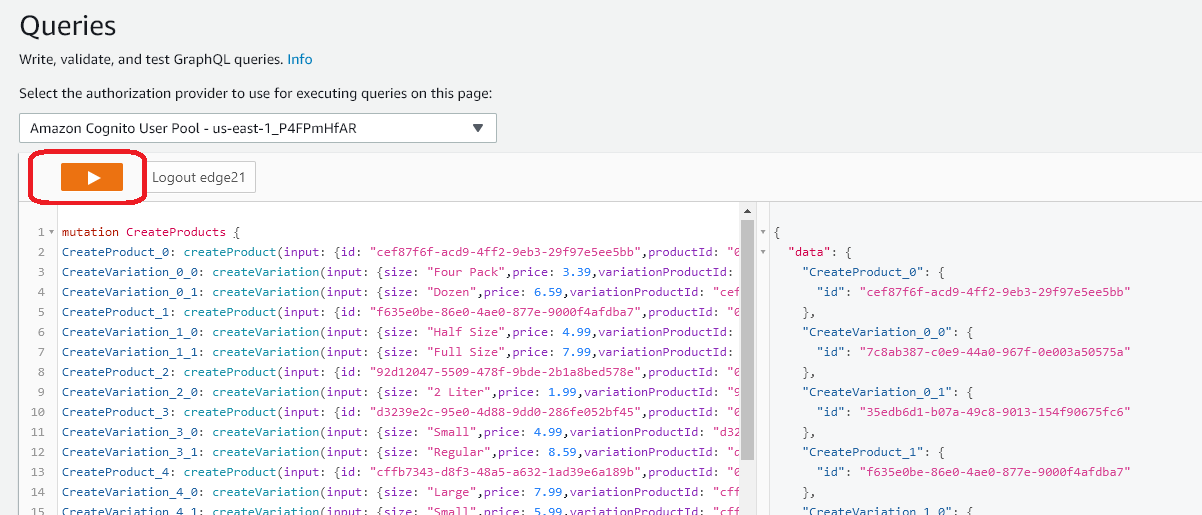
This will load our initial product data - you should see successful logs in the right hand column of the AppSync query console.
Now that we have a backend data store and an API layer to access it, let’s put it into our application.