Adding data to our app
Update the application
Return to your Cloud9 environment. Next, modify the code to display our menu of items. We obviously need this if we are going to allow our users to order something!
Replace the following code in the components/menu.jsx file and save the file:
import React, { Component, Fragment } from "react";
import { Tabs, Tab } from "react-bootstrap";
import { Button, Container, Row, Col } from "reactstrap";
import { API, graphqlOperation } from "aws-amplify";
class MenuItem extends Component {
state = {
isLoaded: false
};
imageLocation = "https://jah-lex-workshop-2018.s3.amazonaws.com/mob302/images/"
listProductsWithVariant = `query ListProducts(
$filter: ModelProductFilterInput
$limit: Int
$nextToken: String
) {
listProducts(filter: $filter, limit: $limit, nextToken: $nextToken) {
items {
id
productId
productName
category
description
defaultPrice
sizes {
items {
price
size
}
}
}
nextToken
}
}
`;
getDefaultSizes(menuItems) {
var sizeSel = [];
for (var menuItem in menuItems) {
var cItem = menuItems[menuItem];
var sizeSelItem = {
itemId: cItem.productId,
size: cItem.sizes.items[0].size,
price: cItem.sizes.items[0].price
};
sizeSel.push(sizeSelItem);
}
return sizeSel;
}
componentDidMount() {
const limit = {
limit: 100
};
API.graphql(graphqlOperation(this.listProductsWithVariant, limit)).then(
result => {
const sizeSels = this.getDefaultSizes(result.data.listProducts.items);
this.setState({
menuItems: result.data.listProducts.items,
selectedSize: sizeSels,
isLoaded: true
});
}
);
}
getSelectedSize(pId) {
const retVal = this.state.selectedSize.filter(item => item.itemId === pId);
return retVal[0];
}
getPriceForSize(pId, selSize) {
const retVal = this.state.menuItems.filter(item => item.productId === pId);
const rVal2 = retVal[0].sizes.items.filter(item2 => item2.size === selSize);
return rVal2[0].price;
}
getPrice(pId) {
const retVal = this.state.selectedSize.filter(item => item.itemId === pId);
return retVal[0].price.toFixed(2);
}
getItem(itemName, itemId, itemQuantity) {
const sSize = this.getSelectedSize(itemId);
const itemSize = sSize.size;
const itemPrice = sSize.price;
return {
itemName: itemName,
size: itemSize,
price: itemPrice,
quantity: itemQuantity
};
}
onChangeSize(pid, event) {
const selSize = event.target.value;
var currSel = this.state.selectedSize;
var newSel = [];
for (var s in currSel) {
var cItem = currSel[s];
if (cItem.itemId === pid) {
cItem = {
itemId: pid,
size: selSize,
price: this.getPriceForSize(pid, selSize)
};
}
newSel.push(cItem);
}
this.setState({
selectedSize: newSel
});
}
render() {
return (
<Fragment>
<b>Add New Item</b>
<Tabs defaultActiveKey="profile" id="uncontrolled-tab-example">
<Tab eventKey="pizza" title="Pizza">
<Container>
{this.state.isLoaded
? this.state.menuItems
.filter(fItem => fItem.category === "PIZZA")
.map(menuItem => (
<Row key={menuItem.productId}>
<Col>
<img
src={`${this.imageLocation}${menuItem.productId}${".png"}`}
alt="Pizza"
width="100"
height="100"
className="position-relative img-fluid"
/>
</Col>
<Col>
<b>{menuItem.productName}</b>
<br></br>
{menuItem.description}
</Col>
<Col>
<select
id="menuSize"
onChange={this.onChangeSize.bind(
this,
menuItem.productId
)}
>
{menuItem.sizes.items.map(sizeItem => (
<option key={sizeItem.size} value={sizeItem.size}>
{sizeItem.size}
</option>
))}
</select>
<Button
onClick={() =>
this.props.onAddItem
? this.props.onAddItem(
this.getItem(
`${menuItem.productName}`,
`${menuItem.productId}`,
1
)
)
: null
}
>
Add To Order
</Button>
</Col>
<Col>$ {this.getPrice(menuItem.productId)}</Col>
</Row>
))
: null}
</Container>
</Tab>
<Tab eventKey="subs" title="Subs">
<Container>
{this.state.isLoaded
? this.state.menuItems
.filter(fItem => fItem.category === "SUB")
.map(menuItem => (
<Row key={menuItem.productId}>
<Col>
<img
src={`${this.imageLocation}${menuItem.productId}${".png"}`}
alt="Sub"
width="100"
height="100"
className="position-relative img-fluid"
/>
</Col>
<Col>
<b>{menuItem.productName}</b>
<br></br>
{menuItem.description}
</Col>
<Col>
<select
id="menuSize"
onChange={this.onChangeSize.bind(
this,
menuItem.productId
)}
>
{menuItem.sizes.items.map(sizeItem => (
<option key={sizeItem.size} value={sizeItem.size}>
{sizeItem.size}
</option>
))}
</select>
<Button
onClick={() =>
this.props.onAddItem
? this.props.onAddItem(
this.getItem(
`${menuItem.productName}`,
`${menuItem.productId}`,
1
)
)
: null
}
>
Add To Order
</Button>
</Col>
<Col>$ {this.getPrice(menuItem.productId)}</Col>
</Row>
))
: null}
</Container>
</Tab>
<Tab eventKey="sides" title="Sides">
<Container>
{this.state.isLoaded
? this.state.menuItems
.filter(fItem => fItem.category === "SIDE")
.map(menuItem => (
<Row key={menuItem.productId}>
<Col>
<img
src={`${this.imageLocation}${menuItem.productId}${".png"}`}
alt="Side"
width="100"
height="100"
className="position-relative img-fluid"
/>
</Col>
<Col>
<b>{menuItem.productName}</b>
<br></br>
{menuItem.description}
</Col>
<Col>
<select
id="menuSize"
onChange={this.onChangeSize.bind(
this,
menuItem.productId
)}
>
{menuItem.sizes.items.map(sizeItem => (
<option key={sizeItem.size} value={sizeItem.size}>
{sizeItem.size}
</option>
))}
</select>
<Button
onClick={() =>
this.props.onAddItem
? this.props.onAddItem(
this.getItem(
`${menuItem.productName}`,
`${menuItem.productId}`,
1
)
)
: null
}
>
Add To Order
</Button>
</Col>
<Col>$ {this.getPrice(menuItem.productId)}</Col>
</Row>
))
: null}
</Container>
</Tab>
</Tabs>
</Fragment>
);
}
}
export default MenuItem;
Then, we need to add the menu to our App.js file. Replace the contents of App.js with this and save App.js:
import React, { Fragment, Component } from "react";
import "./App.css";
import { Container, Row, Col } from "reactstrap";
import Header from "./components/header";
import SideCard from "./components/sideCard";
import Stores from "./components/stores";
import MenuItem from "./components/menu";
import Amplify, { Auth, Hub } from "aws-amplify";
import { AmplifyAuthenticator, AmplifySignOut } from "@aws-amplify/ui-react";
import awsconfig from "./aws-exports";

Amplify.configure(awsconfig);

const signUpConfig = {
  header: "Welcome!",
  signUpFields: [
    {
      label: "First Name",
      key: "given_name",
      placeholder: "First Name",
      required: true,
      displayOrder: 5
    },
    {
      label: "Last Name",
      key: "family_name",
      placeholder: "Last Name",
      required: true,
      displayOrder: 6
    },
    {
      label: "Address",
      key: "address",
      placeholder: "Address",
      required: true,
      displayOrder: 7
    }
  ]
};

class App extends Component {
  state = {
    showType: "",
    loggedIn: false,
    currentUser: null
  };

  loadCurrentUser() {
    Auth.currentAuthenticatedUser().then(userInfo => {
      this.setState({
        loggedIn: true,
        currentUser: userInfo.username,
        currentUserData: userInfo
      });
    });
  }
  componentDidMount = () => {
    Hub.listen("auth", ({ payload: { event, data } }) => {
      switch (event) {
        case "signIn":
          this.setState({
            currentUser: data.username,
            currentUserData: data,
            loggedIn: true
          });
          break;
        case "signOut":
          this.setState({
            currentUser: null,
            loggedIn: false
          });
          break;
        default:
          break;
      }
    });
    this.loadCurrentUser();
  };

  handleLogin = () => {
    this.setState({
      showType: "login"
    });
  };

  handleLogout = () => {
    this.setState({
      showType: "login"
    });
  };

  handleOrder = () => {
    this.setState({
      showType: "menu"
    });
  };

  handleStores = () => {
    this.setState({
      showType: "stores",
    });
  };

  render() {
    return (
      <Fragment>
        <Header
          onHandleLogin={this.handleLogin}
          onHandleLogout={this.handleLogout}
          loggedIn={this.state.loggedIn}
          userName={this.state.currentUser}
          onHandleOrder={this.handleOrder}
          onHandleStores={this.handleStores}
        />
        <div className="my-5 py-5">
          <Container className="px-0">
            <Row
              noGutters
              className="pt-2 pt-md-5 w-100 px-4 px-xl-0 position-relative"
            >
              <Col
                xs={{ order: 2 }}
                md={{ size: 4, order: 1 }}
                tag="aside"
                className="pb-5 mb-5 pb-md-0 mb-md-0 mx-auto mx-md-0"
              >
                <SideCard />
              </Col>

              <Col
                xs={{ order: 1 }}
                md={{ size: 7, offset: 1 }}
                tag="section"
                className="py-5 mb-5 py-md-0 mb-md-0"
              >
                {this.state.showType === "" ? "This is the main content" : null}
                {this.state.showType === "stores" ? <Stores /> : null}
                {this.state.showType === "login" ? (
                  <AmplifyAuthenticator signUpConfig={signUpConfig}>
                  <div>
                    You are logged in.
                    <AmplifySignOut />
                  </div>
                </AmplifyAuthenticator>
                ) : null}
                {this.state.showType === "menu" ? (<MenuItem onAddItem={this.handleAddItem}></MenuItem>) : null}
              </Col>
            </Row>
          </Container>
        </div>
      </Fragment>
    );
  }
}

export default App;
This new code basically hooked up the menu to our Menu button: – <MenuItem onAddItem={this.handleAddItem}></MenuItem>
Now, we can return to our app and when we click the Menu link, we can you view our Pizza Menu:
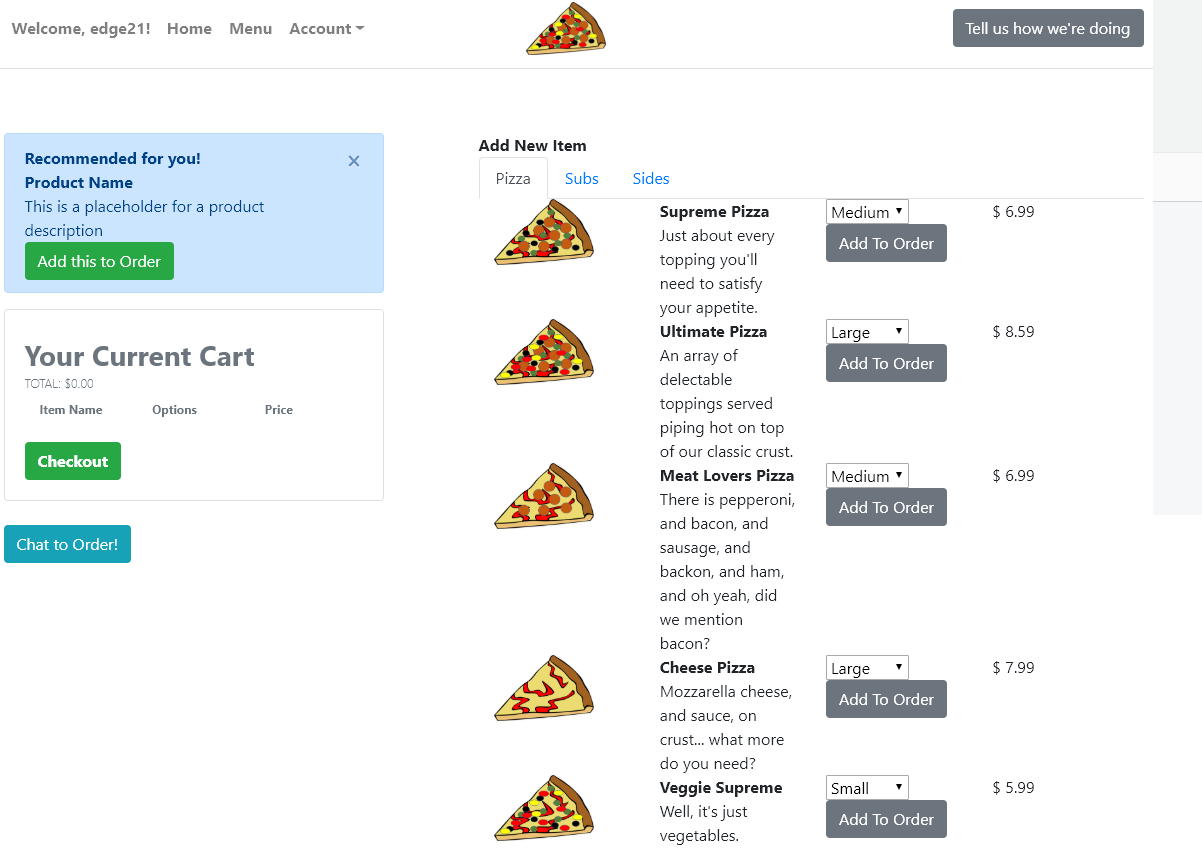
If you do not see the menu of items, make sure that you have logged in!
Next, update App.js file to handle the adding of items to our cart. Replace App.js with the following code and save the App.js file:
import React, { Fragment, Component } from "react";
import "./App.css";
import { Container, Row, Col, Button } from "reactstrap";
import Header from "./components/header";
import SideCard from "./components/sideCard";
import Stores from "./components/stores";
import MenuItem from "./components/menu";
import OrderHistory from "./components/orders";
import Amplify, {Auth, Hub, Cache, API, graphqlOperation} from "aws-amplify";
import { AmplifyAuthenticator, AmplifySignOut } from "@aws-amplify/ui-react";
import { createOrder, createItem, updateOrder } from "./graphql/mutations";
import awsconfig from "./aws-exports";

Amplify.configure(awsconfig);

const signUpConfig = {
  header: "Welcome!",
  signUpFields: [
    {
      label: "First Name",
      key: "given_name",
      placeholder: "First Name",
      required: true,
      displayOrder: 5
    },
    {
      label: "Last Name",
      key: "family_name",
      placeholder: "Last Name",
      required: true,
      displayOrder: 6
    },
    {
      label: "Address",
      key: "address",
      placeholder: "Address",
      required: true,
      displayOrder: 7
    }
  ]
};

class App extends Component {
  state = {
    showType: "",
    loggedIn: false,
    currentUser: null
  };

  listProductsWithVariant = `query ListProducts(
    $filter: ModelProductFilterInput
    $limit: Int
    $nextToken: String
  ) {
    listProducts(filter: $filter, limit: $limit, nextToken: $nextToken) {
      items {
        id
        productId
        productName
        category
        description
        defaultPrice
        sizes {
            items {
              price
              size
            }
          }
      }
      nextToken
    }
  }
  `;

  async loadExistingOrder(orderId) {
    const getOrderWithItems = `query GetOrder($id: ID!) {
      getOrder(id: $id) {
        id
        name
        user
        phone
        email
        orderDate
        orderTotal
        deliveryType
        deliveryDate
        status
        items {
          items {
            id
            itemName
            comments
            quantity
            size
            unitPrice
            totalPrice
          }
          nextToken
        }
      }
    }
    `;
    // Now we want to update the state with the new order data
    const orderInput = {
      id: orderId
    };
    const getOrderResult = await API.graphql(
      graphqlOperation(getOrderWithItems, orderInput)
    );
    this.setState({
      currentOrder: getOrderResult.data.getOrder
    });
  }

  createNewItem = async itemInput => {
    const newItem = await API.graphql(
      graphqlOperation(createItem, {
        input: itemInput
      })
    );
    return newItem;
  };

  createNewOrder = async orderInput => {
    const newOrder = await API.graphql(
      graphqlOperation(createOrder, {
        input: orderInput
      })
    );
    return newOrder;
  };

  appendLeadingZeroes = n => {
    if (n <= 9) {
      return "0" + n;
    }
    return n;
  };

  createOrderName(today) {
    return (
      today.getFullYear() +
      "-" +
      this.appendLeadingZeroes(today.getMonth() + 1) +
      "-" +
      this.appendLeadingZeroes(today.getDate())
    );
  }

  getOrderDate(today) {
    return (
      today.getFullYear() +
      "-" +
      this.appendLeadingZeroes(today.getMonth() + 1) +
      "-" +
      this.appendLeadingZeroes(today.getDate()) +
      "T" +
      this.appendLeadingZeroes(today.getHours()) +
      ":" +
      this.appendLeadingZeroes(today.getMinutes()) +
      ":" +
      this.appendLeadingZeroes(today.getSeconds()) +
      "-05:00:00"
    );
  }

  async createNewOrderConstruct() {
    var today = new Date();
    var orderName = this.createOrderName(today);
    var orderDate = this.getOrderDate(today);

    const orderInput = {
      name: "ORDER: " + orderName,
      user: this.state.currentUser,
      phone: this.state.currentUserData.attributes.phone_number,
      email: this.state.currentUserData.attributes.email,
      orderDate: orderDate,
      orderTotal: this.getTotal(this.state.currentOrder),
      deliveryType: "Carryout",
      deliveryDate: orderDate,
      status: "IN PROGRESS"
    };

    const newOrder = await this.createNewOrder(orderInput);
    return newOrder;
  }
  handleAddItem = async item => {
    var checkOrder = this.state.currentOrder;
    if (!checkOrder) {
      // Create new order
      //var cUser = await Auth.currentAuthenticatedUser();
      var today = new Date();
      const expiration = new Date(today.getTime() + 60 * 60000);
      var newOrder = await this.createNewOrderConstruct();
      Cache.setItem("currentOrder", newOrder.data.createOrder.id, {
        priority: 3,
        expires: expiration.getTime()
      });
      checkOrder = newOrder.data.createOrder;
    }

    var currentOrderId = checkOrder.id;

    const totalPrice = item.quantity * item.price;
    const itemInput = {
      itemName: item.itemName,
      comments: "No Comments",
      quantity: item.quantity,
      size: item.size,
      unitPrice: item.price,
      totalPrice: totalPrice,
      itemOrderId: currentOrderId
    };
    await this.createNewItem(itemInput);
    this.loadExistingOrder(currentOrderId);
  };

  loadCurrentUser() {
    Auth.currentAuthenticatedUser().then(userInfo => {
      this.setState({
        loggedIn: true,
        currentUser: userInfo.username,
        currentUserData: userInfo
      });
    });
  }

  getPriceForSize(pId, selSize) {
    const retVal = this.state.menuItems.filter(item => item.productId === pId);
    const rVal2 = retVal[0].sizes.items.filter(
      item2 => item2.size.toUpperCase() === selSize.toUpperCase()
    );
    return rVal2[0].price;
  }

  isLoggedIn = async () => {
    return await Auth.currentAuthenticatedUser()
      .then(() => {
        return true;
      })
      .catch(() => {
        return false;
      });
  };

  getCurrentUser = async () => {
    const user = await Auth.currentAuthenticatedUser();
    return user;
  };

  getTotal = items => {
    var totalPrice = 0;
    for (var i in items) {
      var qty = items[i]["quantity"];
      var price = items[i]["unitPrice"];
      var qtyPrice = qty * price;
      totalPrice += qtyPrice;
    }
    return totalPrice.toFixed(2);
  };

  createNewOrderConstructSync = () => {
    var today = new Date();
    var orderName = this.createOrderName(today);
    var orderDate = this.getOrderDate(today);

    const orderInput = {
      name: "ORDER: " + orderName,
      user: this.state.currentUser,
      phone: this.state.currentUserData.attributes.phone_number,
      email: this.state.currentUserData.attributes.email,
      orderDate: orderDate,
      orderTotal: this.getTotal(this.state.currentOrder),
      deliveryType: "Carryout",
      deliveryDate: orderDate,
      status: "IN PROGRESS"
    };

    this.createNewOrder(orderInput)
      .then(newOrder => {
        return newOrder;
      })
      .catch(err => {
        console.log(err);
      });
  };

  createNewItemSync = itemInput => {
    API.graphql(
      graphqlOperation(createItem, {
        input: itemInput
      })
    ).then(newItem => {
      return newItem;
    });
  };

  getItems = cOrder => {
    if (cOrder && cOrder.items) {
      return cOrder.items.items;
    } else {
      return null;
    }
  };

  completeOrder = () => {
    this.setState({ showType: "orderComplete" });
    const orderInput = {
      id: this.state.currentOrder.id,
      name: this.state.currentOrder.name,
      user: this.state.currentUser,
      phone: this.state.currentOrder.phone,
      email: this.state.currentOrder.email,
      orderDate: this.state.currentOrder.orderDate,
      orderTotal: this.getTotal(this.state.currentOrder.items.items),
      deliveryType: "Carryout",
      deliveryDate: this.state.currentOrder.deliveryDate,
      status: "COMPLETE"
    };

    API.graphql(
      graphqlOperation(updateOrder, {
        input: orderInput
      })
    ).then(result => {
      this.setState({
        currentOrder: null
      });
      Cache.removeItem("currentOrder");
    });
  };

  componentDidMount = () => {
    Hub.listen("auth", ({ payload: { event, data } }) => {
      switch (event) {
        case "signIn":
          this.setState({
            currentUser: data.username,
            currentUserData: data,
            loggedIn: true
          });
          break;
        case "signOut":
          this.setState({
            currentUser: null,
            loggedIn: false
          });
          break;
        default:
          break;
      }
    });
    this.loadCurrentUser();

    var currentOrderId = null;
    var checkOrder = this.state.currentOrder;
    if (checkOrder) currentOrderId = checkOrder.id;
    else currentOrderId = Cache.getItem("currentOrder");
    if (currentOrderId) {
      this.loadExistingOrder(currentOrderId);
    }

    // Get menu items
    API.graphql(graphqlOperation(this.listProductsWithVariant)).then(result => {
      this.setState({
        menuItems: result.data.listProducts.items
      });
    });

  };

  handleLogin = () => {
    this.setState({
      showType: "login"
    });
  };

  handleLogout = () => {
    this.setState({
      showType: "login"
    });
  };

  handleOrder = () => {
    this.setState({
      showType: "menu"
    });
  };

  handleStores = () => {
    this.setState({
      showType: "stores",
    });
  };

  handleHistory = () => {
    this.setState({
      showType: "orders"
    });
  };

  handleCheckout = () => {
    this.setState({
      showType: "checkout"
    });
  };

  render() {
    return (
      <Fragment>
        <Header
          onHandleLogin={this.handleLogin}
          onHandleLogout={this.handleLogout}
          onHandleHistory={this.handleHistory}
          loggedIn={this.state.loggedIn}
          userName={this.state.currentUser}
          onHandleOrder={this.handleOrder}
          onHandleStores={this.handleStores}
        />
        <div className="my-5 py-5">
          <Container className="px-0">
            <Row
              noGutters
              className="pt-2 pt-md-5 w-100 px-4 px-xl-0 position-relative"
            >
              <Col
                xs={{ order: 2 }}
                md={{ size: 4, order: 1 }}
                tag="aside"
                className="pb-5 mb-5 pb-md-0 mb-md-0 mx-auto mx-md-0"
              >
                <SideCard currentOrder={this.state.currentOrder} onHandleCheckout={this.handleCheckout}/>
              </Col>

              <Col
                xs={{ order: 1 }}
                md={{ size: 7, offset: 1 }}
                tag="section"
                className="py-5 mb-5 py-md-0 mb-md-0"
              >
                {this.state.showType === "" ? "This is the main content" : null}
                {this.state.showType === "stores" ? <Stores /> : null}
                {this.state.showType === "login" ? (
                  <AmplifyAuthenticator signUpConfig={signUpConfig}>
                    <div>
                      You are logged in.
                      <AmplifySignOut />
                    </div>
                  </AmplifyAuthenticator>
                ) : null}
                {this.state.showType === "menu" ? (<MenuItem onAddItem={this.handleAddItem}></MenuItem>) : null}
                {this.state.showType === "orders" ? (
                  <OrderHistory userName={this.state.currentUser} />
                ) : null}
                {this.state.showType === "checkout" ? (
                  <Fragment>
                    <Container>
                      <Row className="font-weight-bold">
                        <Col>Item Name</Col>
                        <Col>Options</Col>
                        <Col>Price</Col>
                      </Row>
                      {this.getItems(this.state.currentOrder)
                        ? this.getItems(this.state.currentOrder).map(
                            orderInfo => (
                              <Row key={orderInfo.id}>
                                <Col>{orderInfo.itemName}</Col>
                                <Col>Qty: {orderInfo.quantity}</Col>
                                <Col>{orderInfo.totalPrice}</Col>
                              </Row>
                            )
                          )
                        : null}
                      <Row>
                        <Col>TOTAL</Col>
                        <Col></Col>
                        <Col>
                          $
                          {this.getTotal(
                            this.getItems(this.state.currentOrder)
                          )}
                        </Col>
                      </Row>
                    </Container>
                    <Button onClick={this.completeOrder}>Complete Order</Button>
                  </Fragment>
                ) : null}
                {this.state.showType === "orderComplete" ? (
                  <div>Thank you for your order!</div>
                ) : null}

              </Col>
            </Row>
          </Container>
        </div>
      </Fragment>
    );
  }
}

export default App;
The code above accomplishes the following:
- Add the Cache and graphql imports –
import { createOrder, createItem } from "./graphql/mutations"; - Adds handler to respond to the “Add To Order” menu button –
handleAddItem = async item => { - Creates and caches the order in state
Next, add the following code to components/orders.jsx and save the file orders.jsx:
import React, { Component, Fragment } from "react";
import { API, graphqlOperation } from "aws-amplify";
import { listOrders } from "../graphql/queries";
import { Container, Row, Col } from "reactstrap";

class OrderHistory extends Component {
  state = {
    orderData: null
  };

  componentDidMount() {
    const userId = this.props.userName;
    API.graphql(
      graphqlOperation(listOrders, {
        limit: 30,
        filter: {
          user: { eq: userId }
        }
      })
    ).then(result => {
      this.setState({
        orderData: result.data.listOrders.items
      });
    });
  }

  getDate(dateStr) {
    return dateStr.substring(0, 10);
  }
  render() {
    return (
      <Fragment>
        <b>Your Order History</b>
        <Container>
          <Row className="font-weight-bold">
            <Col>Order Date</Col>
            <Col>Order Status</Col>
            <Col>Order Total</Col>
          </Row>
          {this.state.orderData
            ? this.state.orderData.map(orderInfo => (
                <Row key={orderInfo.id}>
                  <Col>{this.getDate(orderInfo.orderDate)}</Col>
                  <Col>{orderInfo.status}</Col>
                  <Col>$ {orderInfo.orderTotal}</Col>
                </Row>
              ))
            : "NO CURRENT ORDERS"}
        </Container>
      </Fragment>
    );
  }
}

export default OrderHistory;
The above code displays order history for the user.
Next, update components/sideCard.jsx file to display our cart items when the order changes. Save the file sideCard.jsx:
import React, { Component, Fragment } from "react";
import {
  Button,
  UncontrolledAlert,
  Card,
  CardBody,
  CardTitle,
  CardSubtitle,
  Container,
  Row,
  Col
} from "reactstrap";

class SideCard extends Component {
  state = {};

  getTotal = items => {
    var totalPrice = 0;
    for (var i in items) {
      var qty = items[i]["quantity"];
      var price = items[i]["unitPrice"];
      var qtyPrice = qty * price;
      totalPrice += qtyPrice;
    }
    return totalPrice.toFixed(2);
  };

  getItems = cOrder => {
    if (cOrder && cOrder.items) {
      return cOrder.items.items;
    } else {
      return null;
    }
  };


  render() {
    const localItems = this.getItems(this.props.currentOrder);
    return (
      <Fragment>
        <UncontrolledAlert color="primary" className="d-none d-lg-block">
          <strong>Recommended for you!</strong>
          <br />
          <Fragment>
            <b>Product Name</b>
            <br></br>
            This is a placeholder for a product description
            <br></br>
            <Button color="success">Add this to Order</Button>
          </Fragment>
        </UncontrolledAlert>

        <Card>
          <CardBody>
            <CardTitle className="h3 mb-2 pt-2 font-weight-bold text-secondary">
              Your Current Cart
            </CardTitle>
            <CardSubtitle
              className="text-secondary mb-2 font-weight-light text-uppercase"
              style={{ fontSize: "0.8rem" }}
            >
              Total: ${this.getTotal(localItems)}
            </CardSubtitle>
            <div
              className="text-secondary mb-4"
              style={{ fontSize: "0.75rem" }}
            >
              <Container>
                <Row className="font-weight-bold">
                  <Col>Item Name</Col>
                  <Col>Options</Col>
                  <Col>Price</Col>
                </Row>
                {localItems
                  ? localItems.map(orderInfo => (
                      <Row key={orderInfo.id}>
                        <Col>{orderInfo.itemName}</Col>
                        <Col>Qty: {orderInfo.quantity}</Col>
                        <Col>{orderInfo.totalPrice}</Col>
                      </Row>
                    ))
                  : null}
              </Container>
            </div>
            <Button
              color="success"
              className="font-weight-bold"
              onClick={() =>
                this.props.onHandleCheckout
                  ? this.props.onHandleCheckout()
                  : null
              }
            >
              Checkout
            </Button>
          </CardBody>
        </Card>


        <br />
        <Button
          color="info"
          onClick={() =>
            this.props.onHandleChat ? this.props.onHandleChat() : null
          }
        >
          Chat to Order!
        </Button>
      </Fragment>
    );
  }
}

export default SideCard;
This code receives the current order information and displays each item in the cart, and creates the total.
Finally, return to the preview application, open the menu, and add a few items to the order.
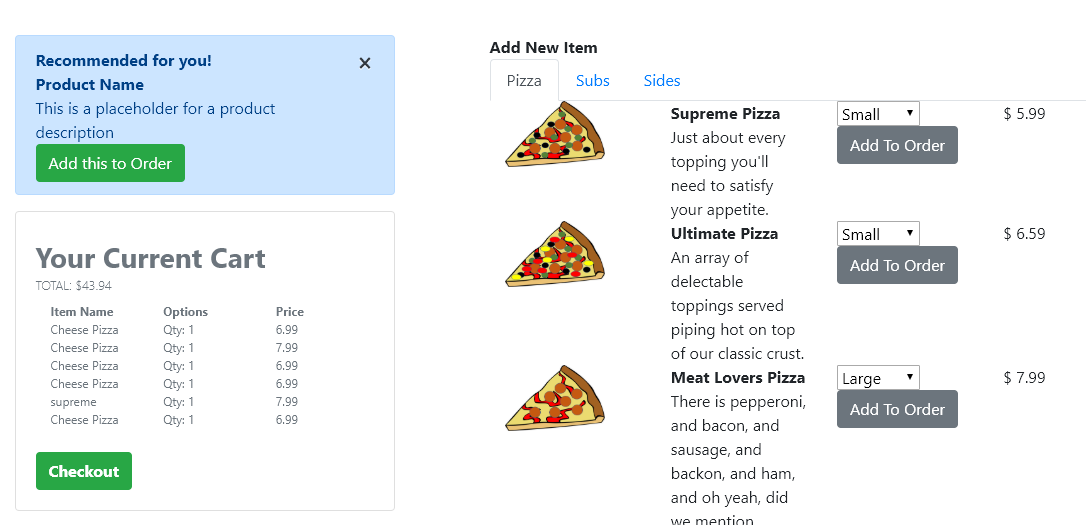
Now, we have a fully functioning pizza ordering application!