Adding Comments to the App
Add Comments to the App
Now, we are going to add the code to save our comments. Add this code to the src\components\comments.jsx file and save it:
import React, { Component, Fragment  } from "react";
import {API, Storage, graphqlOperation } from 'aws-amplify';
import { createComment } from "../graphql/mutations"
import { Button, Container, Row, Col, Input } from "reactstrap";
import { Dropdown, DropdownToggle, DropdownMenu, DropdownItem } from 'reactstrap';

class Comments extends Component {

        state = {
            isLoaded: false,
            commentSubmitted: false,
            currentComments: "",
            currentFile: null
        }

 updateFile = (event) => {
   this.setState({currentFile: event.target.files[0]});
 }

 uploadFile = (commentId) => {
   const accessLevel = 'private';
   const filePath = 'comments/' + commentId + '/' + this.state.currentFile.name;

   Storage.put(filePath, this.state.currentFile, { level: accessLevel})
    .then(result => {
      console.log(result)
    })
    .catch(err => console.log(err))

 }
 submitComments = () => {

   var fileName = "";
   if (this.state.currentFile)
    fileName = this.state.currentFile.name;
   const itemInput = {
       comment: this.state.currentComments,
       status: 'Pending',
       file: fileName
   }
   API.graphql(
       graphqlOperation(createComment, {input: itemInput}))
       .then(result => {
           console.log(result);
           this.setState({commentSubmitted: true});
           if (this.state.currentFile) {
               this.uploadFile(result.data.createComment.id);
           }
       })
       .catch(err => console.log(err))

 }

 updateComments(event) {
    this.setState( { currentComments: event.target.value });
  }

    render() {
    return (
        <Fragment>
            {this.state.commentSubmitted ? <b>Thanks for your comment!</b> :
            <Fragment>
            <b>Enter your comments:</b><br/>
            <Input
                type="textarea"
                rows="6"
                onChange={this.updateComments.bind(this)}
            ></Input>
            <br></br>
            <b>Upload an image that shows us your experience!</b>
            Select a file: <Input type="file" id="contentFile" size="15" onChange={this.updateFile.bind(this)}/>
            <br/><br/>

            <Button
                type="submit"
                onClick={this.submitComments.bind(this)}
            >
                Submit Feedback
            </Button>
            </Fragment>
            }
        </Fragment>
    )
    }
} export default Comments;
Next, add this code to the src\components\header.jsx file and save it:
import React from "react";

import {
  Container,
  Row,
  Col,
  Button,
  Navbar,
  Nav,
  NavbarBrand,
  NavLink,
  NavItem,
  UncontrolledDropdown,
  DropdownToggle,
  DropdownMenu,
  DropdownItem,
} from "reactstrap";

const Header = (props) => {
  const currentUser = props.userName;
  return (
    <header>
      <Navbar
        fixed="top"
        color="light"
        light
        expand="xs"
        className="border-bottom border-gray bg-white"
        style={{ height: 80 }}
      >
        <Container>
          <Row noGutters className="position-relative w-100 align-items-center">
            <Col className="d-none d-lg-flex justify-content-start">
              <Nav className="mrx-auto" navbar>
                {currentUser ? (
                  <NavItem className="d-flex align-items-center">
                    <NavLink className="font-weight-bold" href="/">
                      Welcome, {currentUser}!
                    </NavLink>
                  </NavItem>
                ) : null}

                <NavItem className="d-flex align-items-center">
                  <NavLink className="font-weight-bold" href="/">
                    Home
                  </NavLink>
                </NavItem>

                <NavItem
                  className="d-flex align-items-center"
                  onClick={() => props.onHandleOrder()}
                >
                  <NavLink className="font-weight-bold btn">Menu</NavLink>
                </NavItem>

                <UncontrolledDropdown
                  className="d-flex align-items-center"
                  nav
                  inNavbar
                >
                  <DropdownToggle className="font-weight-bold" nav caret>
                    Account
                  </DropdownToggle>
                  <DropdownMenu right>
                    <DropdownItem
                      className="font-weight-bold text-secondary text-uppercase"
                      header
                      disabled
                    >
                      My Account
                    </DropdownItem>
                    <DropdownItem divider />
                    {currentUser ? <DropdownItem>Profile</DropdownItem> : null}
                    {currentUser ? (
                      <DropdownItem onClick={() => props.onHandleStores()}>
                        Store Admin
                      </DropdownItem>
                    ) : null}
                    {currentUser ? (
                      <DropdownItem onClick={() => props.onHandleHistory()}>
                        Order History
                      </DropdownItem>
                    ) : null}
                    {currentUser ? (
                      <DropdownItem
                        onClick={() =>
                          props.onHandleLogout ? props.onHandleLogout() : null
                        }
                      >
                        Logout
                      </DropdownItem>
                    ) : (
                      <DropdownItem onClick={() => props.onHandleLogin()}>
                        Login
                      </DropdownItem>
                    )}
                  </DropdownMenu>
                </UncontrolledDropdown>
              </Nav>
            </Col>

            <Col className="d-flex justify-content-xs-start justify-content-lg-center">
              <NavbarBrand
                className="d-inline-block p-0"
                href="/"
                style={{ width: 80 }}
              >
                <img
                  src="https://jah-lex-workshop-2018.s3.amazonaws.com/mob302/images/0001.png"
                  alt="logo"
                  className="position-relative img-fluid"
                />
              </NavbarBrand>
            </Col>

            <Col className="d-none d-lg-flex justify-content-end">
              <Button
                className="info"
                onClick={() =>
                  props.onHandleComments ? props.onHandleComments() : null
                }
              >
                Tell us how we're doing
              </Button>
            </Col>
          </Row>
        </Container>
      </Navbar>
    </header>
  );
};
export default Header;
Finally, update the src\App.js file and save:
import React, { Fragment, Component } from "react";
import "./App.css";
import { Container, Row, Col, Button } from "reactstrap";
import Header from "./components/header";
import SideCard from "./components/sideCard";
import Stores from "./components/stores";
import MenuItem from "./components/menu";
import Comments from "./components/comments";
import OrderHistory from "./components/orders";
import Amplify, {Auth, Hub, Cache, API, graphqlOperation} from "aws-amplify";
import { AmplifyAuthenticator, AmplifySignOut } from "@aws-amplify/ui-react";
import { createOrder, createItem, updateOrder } from "./graphql/mutations";
import awsconfig from "./aws-exports";

Amplify.configure(awsconfig);

const signUpConfig = {
  header: "Welcome!",
  signUpFields: [
    {
      label: "First Name",
      key: "given_name",
      placeholder: "First Name",
      required: true,
      displayOrder: 5
    },
    {
      label: "Last Name",
      key: "family_name",
      placeholder: "Last Name",
      required: true,
      displayOrder: 6
    },
    {
      label: "Address",
      key: "address",
      placeholder: "Address",
      required: true,
      displayOrder: 7
    }
  ]
};

class App extends Component {
  state = {
    showType: "",
    loggedIn: false,
    currentUser: null
  };

  listProductsWithVariant = `query ListProducts(
    $filter: ModelProductFilterInput
    $limit: Int
    $nextToken: String
  ) {
    listProducts(filter: $filter, limit: $limit, nextToken: $nextToken) {
      items {
        id
        productId
        productName
        category
        description
        defaultPrice
        sizes {
            items {
              price
              size
            }
          }
      }
      nextToken
    }
  }
  `;

  async loadExistingOrder(orderId) {
    const getOrderWithItems = `query GetOrder($id: ID!) {
      getOrder(id: $id) {
        id
        name
        user
        phone
        email
        orderDate
        orderTotal
        deliveryType
        deliveryDate
        status
        items {
          items {
            id
            itemName
            comments
            quantity
            size
            unitPrice
            totalPrice
          }
          nextToken
        }
      }
    }
    `;
    // Now we want to update the state with the new order data
    const orderInput = {
      id: orderId
    };
    const getOrderResult = await API.graphql(
      graphqlOperation(getOrderWithItems, orderInput)
    );
    this.setState({
      currentOrder: getOrderResult.data.getOrder
    });
  }

  createNewItem = async itemInput => {
    const newItem = await API.graphql(
      graphqlOperation(createItem, {
        input: itemInput
      })
    );
    return newItem;
  };

  createNewOrder = async orderInput => {
    const newOrder = await API.graphql(
      graphqlOperation(createOrder, {
        input: orderInput
      })
    );
    return newOrder;
  };

  appendLeadingZeroes = n => {
    if (n <= 9) {
      return "0" + n;
    }
    return n;
  };

  createOrderName(today) {
    return (
      today.getFullYear() +
      "-" +
      this.appendLeadingZeroes(today.getMonth() + 1) +
      "-" +
      this.appendLeadingZeroes(today.getDate())
    );
  }

  getOrderDate(today) {
    return (
      today.getFullYear() +
      "-" +
      this.appendLeadingZeroes(today.getMonth() + 1) +
      "-" +
      this.appendLeadingZeroes(today.getDate()) +
      "T" +
      this.appendLeadingZeroes(today.getHours()) +
      ":" +
      this.appendLeadingZeroes(today.getMinutes()) +
      ":" +
      this.appendLeadingZeroes(today.getSeconds()) +
      "-05:00:00"
    );
  }

  async createNewOrderConstruct() {
    var today = new Date();
    var orderName = this.createOrderName(today);
    var orderDate = this.getOrderDate(today);

    const orderInput = {
      name: "ORDER: " + orderName,
      user: this.state.currentUser,
      phone: this.state.currentUserData.attributes.phone_number,
      email: this.state.currentUserData.attributes.email,
      orderDate: orderDate,
      orderTotal: this.getTotal(this.state.currentOrder),
      deliveryType: "Carryout",
      deliveryDate: orderDate,
      status: "IN PROGRESS"
    };

    const newOrder = await this.createNewOrder(orderInput);
    return newOrder;
  }
  handleAddItem = async item => {
    var checkOrder = this.state.currentOrder;
    if (!checkOrder) {
      // Create new order
      //var cUser = await Auth.currentAuthenticatedUser();
      var today = new Date();
      const expiration = new Date(today.getTime() + 60 * 60000);
      var newOrder = await this.createNewOrderConstruct();
      Cache.setItem("currentOrder", newOrder.data.createOrder.id, {
        priority: 3,
        expires: expiration.getTime()
      });
      checkOrder = newOrder.data.createOrder;
    }

    var currentOrderId = checkOrder.id;

    const totalPrice = item.quantity * item.price;
    const itemInput = {
      itemName: item.itemName,
      comments: "No Comments",
      quantity: item.quantity,
      size: item.size,
      unitPrice: item.price,
      totalPrice: totalPrice,
      itemOrderId: currentOrderId
    };
    await this.createNewItem(itemInput);
    this.loadExistingOrder(currentOrderId);
  };

  loadCurrentUser() {
    Auth.currentAuthenticatedUser().then(userInfo => {
      this.setState({
        loggedIn: true,
        currentUser: userInfo.username,
        currentUserData: userInfo
      });
    });
  }

  getPriceForSize(pId, selSize) {
    const retVal = this.state.menuItems.filter(item => item.productId === pId);
    const rVal2 = retVal[0].sizes.items.filter(
      item2 => item2.size.toUpperCase() === selSize.toUpperCase()
    );
    return rVal2[0].price;
  }

  isLoggedIn = async () => {
    return await Auth.currentAuthenticatedUser()
      .then(() => {
        return true;
      })
      .catch(() => {
        return false;
      });
  };

  getCurrentUser = async () => {
    const user = await Auth.currentAuthenticatedUser();
    return user;
  };

  getTotal = items => {
    var totalPrice = 0;
    for (var i in items) {
      var qty = items[i]["quantity"];
      var price = items[i]["unitPrice"];
      var qtyPrice = qty * price;
      totalPrice += qtyPrice;
    }
    return totalPrice.toFixed(2);
  };

  createNewOrderConstructSync = () => {
    var today = new Date();
    var orderName = this.createOrderName(today);
    var orderDate = this.getOrderDate(today);

    const orderInput = {
      name: "ORDER: " + orderName,
      user: this.state.currentUser,
      phone: this.state.currentUserData.attributes.phone_number,
      email: this.state.currentUserData.attributes.email,
      orderDate: orderDate,
      orderTotal: this.getTotal(this.state.currentOrder),
      deliveryType: "Carryout",
      deliveryDate: orderDate,
      status: "IN PROGRESS"
    };

    this.createNewOrder(orderInput)
      .then(newOrder => {
        return newOrder;
      })
      .catch(err => {
        console.log(err);
      });
  };

  createNewItemSync = itemInput => {
    API.graphql(
      graphqlOperation(createItem, {
        input: itemInput
      })
    ).then(newItem => {
      return newItem;
    });
  };

  getItems = cOrder => {
    if (cOrder && cOrder.items) {
      return cOrder.items.items;
    } else {
      return null;
    }
  };

  completeOrder = () => {
    this.setState({ showType: "orderComplete" });
    const orderInput = {
      id: this.state.currentOrder.id,
      name: this.state.currentOrder.name,
      user: this.state.currentUser,
      phone: this.state.currentOrder.phone,
      email: this.state.currentOrder.email,
      orderDate: this.state.currentOrder.orderDate,
      orderTotal: this.getTotal(this.state.currentOrder.items.items),
      deliveryType: "Carryout",
      deliveryDate: this.state.currentOrder.deliveryDate,
      status: "COMPLETE"
    };

    API.graphql(
      graphqlOperation(updateOrder, {
        input: orderInput
      })
    ).then(result => {
      this.setState({
        currentOrder: null
      });
      Cache.removeItem("currentOrder");
    });
  };

  componentDidMount = () => {
    Hub.listen("auth", ({ payload: { event, data } }) => {
      switch (event) {
        case "signIn":
          this.setState({
            currentUser: data.username,
            currentUserData: data,
            loggedIn: true
          });
          break;
        case "signOut":
          this.setState({
            currentUser: null,
            loggedIn: false
          });
          break;
        default:
          break;
      }
    });
    this.loadCurrentUser();

    var currentOrderId = null;
    var checkOrder = this.state.currentOrder;
    if (checkOrder) currentOrderId = checkOrder.id;
    else currentOrderId = Cache.getItem("currentOrder");
    if (currentOrderId) {
      this.loadExistingOrder(currentOrderId);
    }

    // Get menu items
    API.graphql(graphqlOperation(this.listProductsWithVariant)).then(result => {
      this.setState({
        menuItems: result.data.listProducts.items
      });
    });

  };

  handleLogin = () => {
    this.setState({
      showType: "login"
    });
  };

  handleLogout = () => {
    this.setState({
      showType: "login"
    });
  };

  handleOrder = () => {
    this.setState({
      showType: "menu"
    });
  };

  handleStores = () => {
    this.setState({
      showType: "stores",
    });
  };

  handleComments = () => {
    this.setState({
      showType: "comments",
    });
  };

  handleHistory = () => {
    this.setState({
      showType: "orders"
    });
  };

  handleCheckout = () => {
    this.setState({
      showType: "checkout"
    });
  };

  render() {
    return (
      <Fragment>
        <Header
          onHandleLogin={this.handleLogin}
          onHandleLogout={this.handleLogout}
          onHandleHistory={this.handleHistory}
          loggedIn={this.state.loggedIn}
          userName={this.state.currentUser}
          onHandleOrder={this.handleOrder}
          onHandleStores={this.handleStores}
          onHandleComments={this.handleComments}
        />
        <div className="my-5 py-5">
          <Container className="px-0">
            <Row
              noGutters
              className="pt-2 pt-md-5 w-100 px-4 px-xl-0 position-relative"
            >
              <Col
                xs={{ order: 2 }}
                md={{ size: 4, order: 1 }}
                tag="aside"
                className="pb-5 mb-5 pb-md-0 mb-md-0 mx-auto mx-md-0"
              >
                <SideCard currentOrder={this.state.currentOrder} onHandleCheckout={this.handleCheckout}/>
              </Col>

              <Col
                xs={{ order: 1 }}
                md={{ size: 7, offset: 1 }}
                tag="section"
                className="py-5 mb-5 py-md-0 mb-md-0"
              >
                {this.state.showType === "" ? "This is the main content" : null}
                {this.state.showType === "stores" ? <Stores /> : null}
                {this.state.showType === "login" ? (
                  <AmplifyAuthenticator signUpConfig={signUpConfig}>
                    <div>
                      You are logged in.
                      <AmplifySignOut />
                    </div>
                  </AmplifyAuthenticator>
                ) : null}
                {this.state.showType === "menu" ? (<MenuItem onAddItem={this.handleAddItem}></MenuItem>) : null}
                {this.state.showType === "orders" ? (
                  <OrderHistory userName={this.state.currentUser} />
                ) : null}
                 {this.state.showType === "comments" ? (<Comments/>):null}
                {this.state.showType === "checkout" ? (
                  <Fragment>
                    <Container>
                      <Row className="font-weight-bold">
                        <Col>Item Name</Col>
                        <Col>Options</Col>
                        <Col>Price</Col>
                      </Row>
                      {this.getItems(this.state.currentOrder)
                        ? this.getItems(this.state.currentOrder).map(
                            orderInfo => (
                              <Row key={orderInfo.id}>
                                <Col>{orderInfo.itemName}</Col>
                                <Col>Qty: {orderInfo.quantity}</Col>
                                <Col>{orderInfo.totalPrice}</Col>
                              </Row>
                            )
                          )
                        : null}
                      <Row>
                        <Col>TOTAL</Col>
                        <Col></Col>
                        <Col>
                          $
                          {this.getTotal(
                            this.getItems(this.state.currentOrder)
                          )}
                        </Col>
                      </Row>
                    </Container>
                    <Button onClick={this.completeOrder}>Complete Order</Button>
                  </Fragment>
                ) : null}
                {this.state.showType === "orderComplete" ? (
                  <div>Thank you for your order!</div>
                ) : null}

              </Col>
            </Row>
          </Container>
        </div>
      </Fragment>
    );
  }
}

export default App;
Restart your web application using npm start and then in your web page, click on the button Tell us how we’re doing:
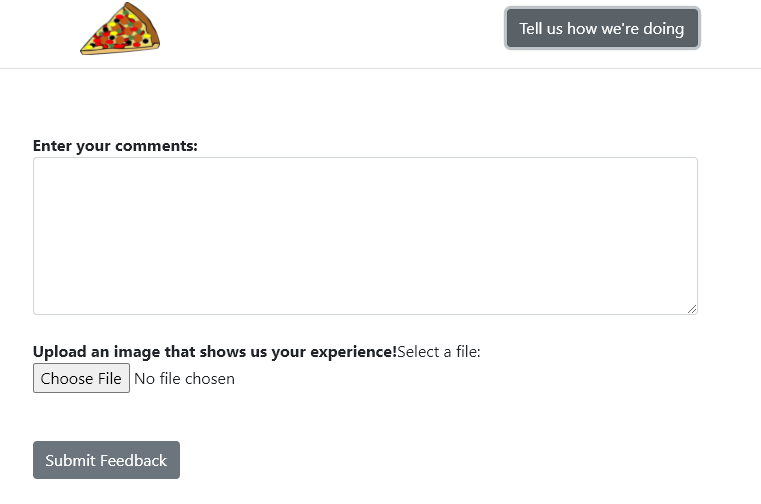
Enter your comments, select a filename, and then click Submit Feedback
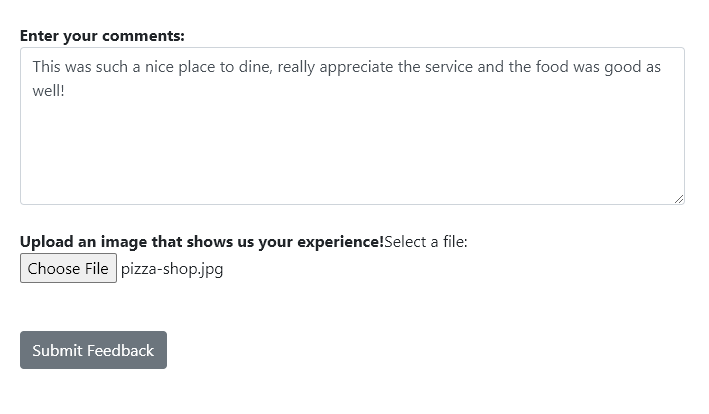
This will do 2 things:
- Save the comment text and file name through the GraphQL API (via AppSync)
- upload a file in the private folder (the amplify API will automatically create an S3 folder based on the user’s Cognito ID)
To view the files, go the Amazon S3 bucket and browse to the private folder.
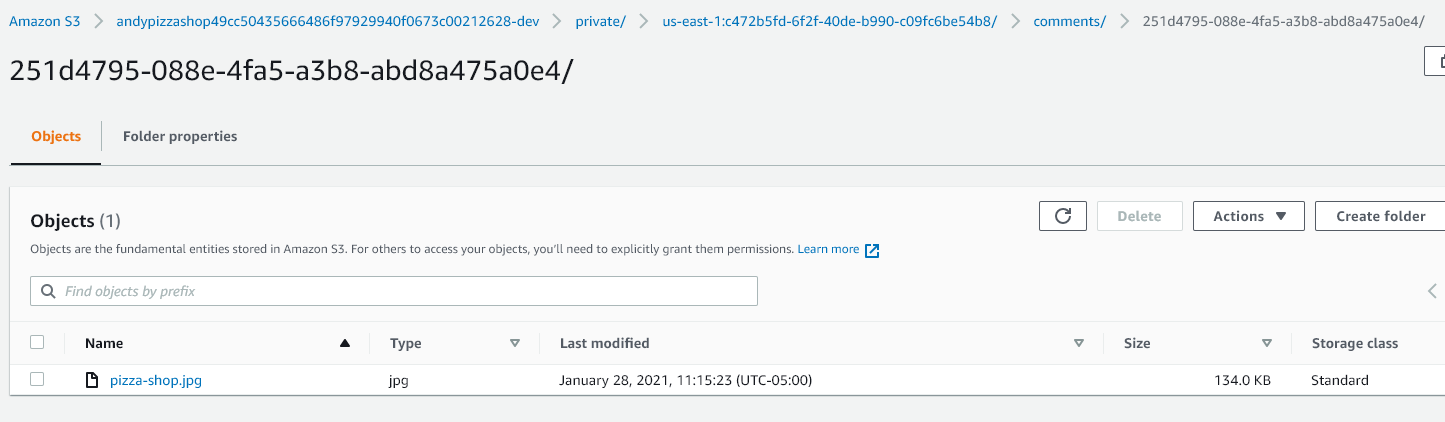
That is it for now! For additional interrogation, you can go into the AppSync console and run some queries.