Adding storage to our app
Amplify Storage commands
The AWS amplify add storage command provides an S3 content integration with three levels of content protection: private, protected, and public.
- private: These files are only accessible for the individual user that uploaded them. By default, these files are stored in your storage bucket under private/{user_identity_id}/ where the user_identity_id corresponds to the unique Amazon Cognito Identity ID for that user.
- protected: These files are readable by all users, but writable only by the creating user. By default, these files are stored under protected/{user_identity_id}/ where the user_identity_id corresponds to the unique Amazon Cognito Identity ID for that user.
- public: These files are read and write accessible by all users of your app. Files are stored under the public/path in your S3 bucket.
More information is available on the Amplify website.
Create a storage location for store marketing
To do this, in our terminal lets run the following command: (If the web server is currently running, press CTRL-C to stop the current running server.)
amplify add storage
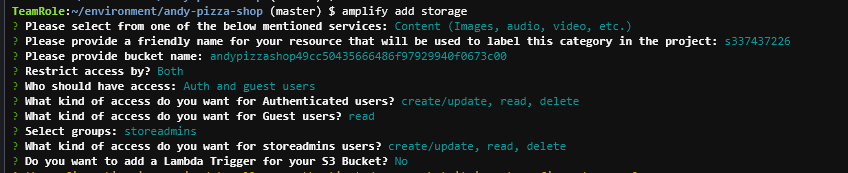
Choose Content (Images, audio, video, etc). Leave the default for friendly name and bucket name, and then select the following:
- Restrict access by: Both
- Who should have access: Auth and guest users
- Access for authenticated users: create, read, delete
- Access for guest users: read
- groups: storeadmins
- Do you want to add a lambda trigger: N
Push the changes using amplify push
amplify push
Update our app
In the stores admin, we are now going to add a section for storeadmins to upload files:
Update the src\components\stores.jsx file with the following content and save:
import React, { Component, Fragment  } from "react";
import {API, Storage, graphqlOperation } from 'aws-amplify';
import { Button, Container, Row, Col, Input } from "reactstrap";
import { Dropdown, DropdownToggle, DropdownMenu, DropdownItem } from 'reactstrap';

class Stores extends Component {

        state = {
            isLoaded: false,
            allowed: false,
            storesData: null,
            currentStoreCode: "",
            currentStoreCodeContent: "",
            currentName: "",
            currentCity: "",
            currentState: "",
            currentStoreCodeToDelete: "",
            contentType: "",
            storeFiles: null,
            currentFile: null
        }

 updateFile = (event) => {
   this.setState({currentFile: event.target.files[0]});
 }

 uploadFile = () => {
   console.log("Uploading file: " + this.state.currentFile.name, this.state.currentStoreCodeContent, this.state.contentType)
   const accessLevel = 'public';
   const filePath = 'stores/' + this.state.currentStoreCodeContent + '/' + this.state.contentType + '/' + this.state.currentFile.name;

   Storage.put(filePath, this.state.currentFile, { level: accessLevel})
    .then(result => {
      console.log(result)
      this.loadStoreFiles();
    })
    .catch(err => console.log(err))

 }

 loadStoreFiles = () => {
   Storage.list('stores/') // for listing ALL files without prefix, pass '' instead
    .then(result => {
      console.log(result);
      this.setState({storeFiles: result})
      })
    .catch(err => console.log(err));
 }

 getStoreFiles = (storeCode) => {
   if (this.state.storeFiles === null)
     return null;
   let fileList = [];

   for (var i=0; i<this.state.storeFiles.length; i++) {
     const fileObj = this.state.storeFiles[i];
     const key = fileObj.key;
     console.log(key, storeCode, key.indexOf('stores/' + storeCode));
     if (key.indexOf('stores/' + storeCode) === 0) {
       const filenameOnly = key.substring(key.lastIndexOf('/')+1)
       const retObj = {
         key: key,
         filename: filenameOnly
       }
       fileList.push(retObj);
     }
   }
   return fileList;
 }

 updateField(event) {
        var txtField = event.target.id;
        var txtValue = event.target.value;
        switch (txtField)
        {
            case "storeCode":
                this.setState( { currentStoreCode: txtValue });
                break;
            case "storeCodeContent":
                this.setState( { currentStoreCodeContent: txtValue });
                break;
            case "name":
                this.setState( { currentName: txtValue });
                break;
            case "city":
                this.setState( { currentCity: txtValue });
                break;
            case "state":
                this.setState( { currentState: txtValue });
                break;
            case "contentType":
                this.setState( { contentType: txtValue });
                break;
            case "delStoreCode":
                this.setState( { currentStoreCodeToDelete: txtValue });
                break;
        }
  }

    deleteStore = () => {
      console.log("Removing Store")
      const apiName = 'storeInfoApi';
      const path = '/stores';
      const myInit = { // OPTIONAL
        headers: {
        }, // OPTIONAL
        response: true, // OPTIONAL (return the entire Axios response object instead of only response.data)
        body: {
            "storeCode": this.state.currentStoreCodeToDelete
        }
      };
      API
        .del(apiName, path, myInit)
        .then(response => {
            console.log("Deleted: " + response)
            this.getLatestStores();
        })
        .catch(error => {
            console.log(error.response);
        });
    }


  updateStore = () => {
      console.log("Store updated")
    const apiName = 'storeInfoApi';
    const path = '/stores';
    const myInit = { // OPTIONAL
        headers: {
        }, // OPTIONAL
        response: true, // OPTIONAL (return the entire Axios response object instead of only response.data)
        body: {
            "storeCode": this.state.currentStoreCode,
            "name": this.state.currentName,
            "city": this.state.currentCity,
            "state": this.state.currentState
        }
    };
      API
  .post(apiName, path, myInit)
  .then(response => {
    console.log("Posted: " + response)
    this.getLatestStores();
  })
  .catch(error => {
    console.log(error.response);
  });
  };

  getLatestStores() {

    const apiName = 'storeInfoApi';
    const path = '/stores';
    const myInit = { // OPTIONAL
        headers: {
        }, // OPTIONAL
        response: true, // OPTIONAL (return the entire Axios response object instead of only response.data)

    };

    API.get(apiName, path, myInit)
  .then(response => {
      this.setState({allowed: true});
        console.log(response);
        this.setState({
            storesData: response.data
        });
        this.loadStoreFiles();
  })
  .catch(error => {
      this.setState({allowed: false});
    console.log(error.response);
 });

  }

 handleClick = (event) => {
   Storage.get(event.target.id, {expires: 60})
   .then(result => {
     console.log(result);
     window.open(result, '_blank');
   })
   .catch(err => console.log(err))

 }

  componentDidMount() {
    console.log("Stores component loaded")
    this.getLatestStores();
  }

    render() {
    return (
      <Fragment>
       {this.state.allowed ?

       <Fragment>
        <b>Stores Administration</b>
        <Container>
          <Row className="font-weight-bold">
            <Col>Store Code</Col>
            <Col>Store Name</Col>
            <Col>City</Col>
            <Col>Files</Col>
          </Row>
          {this.state.storesData
            ? this.state.storesData.map(storeInfo => (
                <Row key={storeInfo.storeCode}>
                  <Col>{storeInfo.storeCode}</Col>
                  <Col>{storeInfo.name}</Col>
                  <Col>{storeInfo.city}, {storeInfo.state}</Col>
                  <Col>
                    {this.getStoreFiles(storeInfo.storeCode)
                      ? this.getStoreFiles(storeInfo.storeCode).map(storeFile => (
                       <span><a href="#" key={storeFile.key} id={storeFile.key} onClick={this.handleClick}>{storeFile.filename}</a><br/></span>
                      ))
                      : "No Files"
                    }
                  </Col>
                </Row>
              ))
            : "NO CURRENT STORES"}
        </Container>
        <hr/>
        <br/>
        <b>Add Content for the Store</b><br/>
        Store Code:
        <Input
                      type="text"
                      id="storeCodeContent"
                      size="10"
                      onChange={this.updateField.bind(this)}
                    ></Input>
        <br/>
        Content Type:
        <Input
                      type="text"
                      id="contentType"
                      size="10"
                      onChange={this.updateField.bind(this)}
                    ></Input>
        <br/>
        Select a file: <Input type="file" id="contentFile" size="15" onChange={this.updateFile.bind(this)}/>
        <br/>
        <Button onClick={this.uploadFile}>Upload File</Button>
        <hr/>
        <br/>
        <b>Add a New Store</b><br/>
        Store Code:
        <Input
                      type="text"
                      id="storeCode"
                      size="10"
                      onChange={this.updateField.bind(this)}
                    ></Input>
        <br/>
        Store Name:
        <Input
                      type="text"
                      id="name"
                      size="10"
                      onChange={this.updateField.bind(this)}
                    ></Input>
        <br/>
        City:
        <Input
                      type="text"
                      id="city"
                      size="10"
                      onChange={this.updateField.bind(this)}
                    ></Input>
        <br/>
        State:
        <Input
                      type="text"
                      id="state"
                      size="10"
                      onChange={this.updateField.bind(this)}
                    ></Input>
        <br/>
        <Button onClick={this.updateStore}>Add / Update Store Data</Button>
        <hr/>
        <b>Remove a Store</b><br/>
        Delete a Store by Code:
        <Input
                      type="text"
                      id="delStoreCode"
                      size="10"
                      onChange={this.updateField.bind(this)}
                    ></Input>
        <br/>
        <Button onClick={this.deleteStore}>Remove Store</Button>

      </Fragment>
       : "Not allowed to view stores data"}

        </Fragment>
)
}
}
export default Stores;
Now, reload our application and select Store Admin from the Account menu. (Remember: you will have to log in as a user who is a member of the storeadmins group).
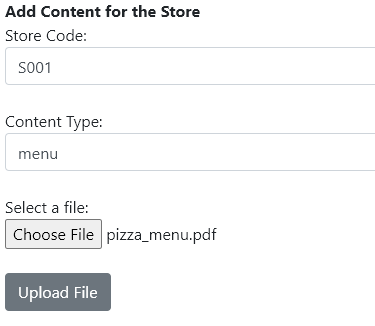
From here, you can now upload a file. Go ahead and enter a Store Code, a content type (e.g., menu), and select a file (preferably a pdf). Then click Upload File
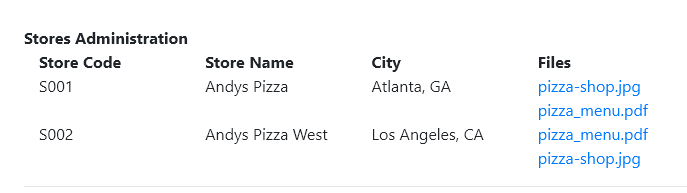
You should now see a new file listed in the Files column for your store.

You can additional files for each store and they will display in the list. Each link is clickable and will download the file to your desktop.
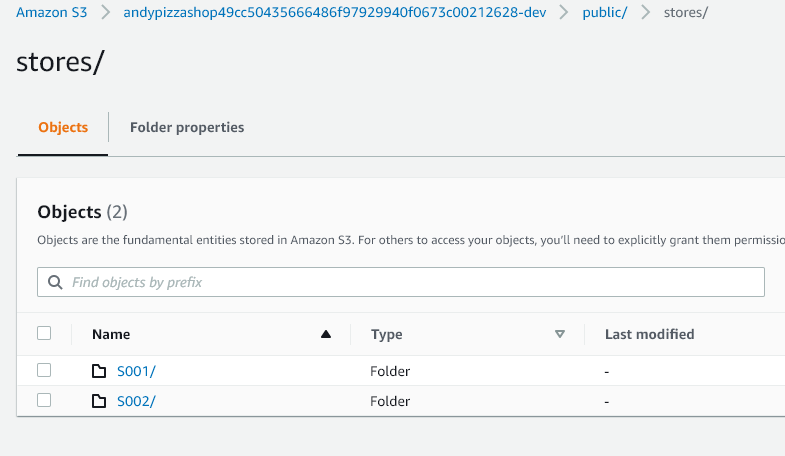
This is a very simple storage solution. The files are being uploaded to the S3 storage bucket that we configured earlier, specifically in the public/stores folder. To view these, you can navigate to the Amazon S3 Console. Find your bucket that you configured, and navigate to the public/stores folder to view the files you uploaded.